
World Trade Center (In Development)
Creator: Urban Architects · 2026-09-25 · Maps · Free on Eaglercraft Studio
Download World Trade Center (In Development) — free Minecraft map. Created by Urban Architects. Tagged land structure. Get the world/schematic file when available and explore more free maps on Eaglercraft Studio.
Creator notes
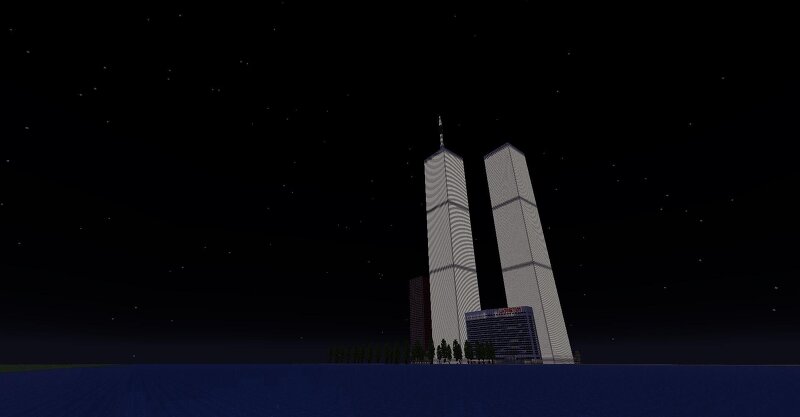
1:1 Scale Twin Towers & World Trade Center Complex (Early Alpha / Work in Progress) Welcome to an ambitious, highly accurate recreation of the original World Trade Center complex! Although I originally intended to hold off on releasing this until completion, I’ve decided to open up this early demo to share the build's massive scale and architectural framework with the community. Regular updates will be released as development progresses toward a complete 1:1 real-world recreation. ⚠️ IMPORTANT REQUIREMENT Extended Height Limit Datapack / Mod Required: Because of the sheer height of the towers and basement structures, this world requires a datapack or mod that extends Java Edition’s build height limits (e.g., custom height limit datapack/mod supporting high Y-coordinates). 🌇 Current Progress & Included Structures North Tower (1 WTC) & South Tower (2 WTC): Exteriors and primary internal cores are mostly complete. 7 World Trade Center: Complete exterior structure (interior is currently empty/shell stage). Plaza & West Street: Unfinished ground-level framework connecting the site. 📏 Scale & Architectural Detail Monstrous Dimensions: Each tower features a massive 100x100 block base . Fl
Added value
What’s included on this page
Preview, categories, compatibility, and tools on this page — not a bare file mirror.
- Creator
- Urban Architects
- Source
- Minecraft downloads library on Eaglercraft Studio
- Type
- Minecraft map / world
- Price
- Free download on Eaglercraft Studio
- Curation
- Listed with credit to Urban Architects · studio preview & install guide
- Compatible with
- Minecraft Java (match version / loader in facts)
- Tags
- Land Structure
Install guide
How to install this free Minecraft map
Eaglercraft Studio map listing with preview, creator credit, and install steps for Java worlds.
- 1Download the world archive (.zip / .mcworld / schematic) when available.
- 2For Java: extract into your .minecraft/saves folder (or import via your launcher).
- 3Launch Minecraft, select the world, and play. Keep a backup before overwriting saves.
Check any version notes in the facts panel — maps often target a specific Minecraft release.
Related free maps
More curated maps from the same library section.

CraftyFoxe · 761 diamonds · 418 views

CraftyFoxe · 761 diamonds · 339 views

CraftyFoxe · 761 diamonds · 319 views

CraftyFoxe · 761 diamonds · 306 views