

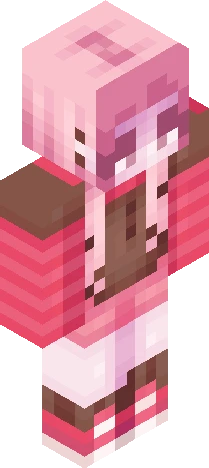
i’m a puzzle with a lot of missing pieces . tr3e
64×64 PNG · Java, Bedrock, Eaglercraft
Click and drag to rotate
Kktr03
by SunnyShift · Minecraft Skins community listing
Free ~ Cheery Cherry ~ // TE skin for Minecraft and Eaglercraft. Tagged kktr03, bysunsce, bysunshair, bysunsls. Use the 3D preview, remix it in our skin editor, or download the PNG with no watermark.
Uploader notes
Entry for sunkkissed's tourney: https://www.minecraftskins.com/skin/24278998/--cherry-spruce---r3--/ I don't usually spread the front hair strands to the arms, since the illusion kinda falls apart in game and in the animated preview. However I felt like the torso was covered too much and that hair overload dulled the skin. Thus, hair on arms (not like that though). Additionally, I usually shade the corners of the head to make it seem rounder, but I wanted to include a little more of the "down" half of the the "half-up half-down" style on the head, so those are gone to make room. This also helps transition from the sides of the head to the ponytail better, in my opinion. . . . Wednesday... Pink... I can't just use that name again though... Even though... that was a Friday...
64×64 · classic or slim is detected from the PNG
Added value
Preview, categories, compatibility, and tools on this page — not a bare file mirror.
Download
Downloads are free. An optional account only saves favorites across devices.
Edit
Eaglercraft · Minecraft
Download the PNG, then apply it in the Eaglercraft client you already use. Menus differ by host. This site does not distribute the game.
Standard model · 64×64. We never ask for a game password. A skin file is only artwork.
More library skins from related categories — curated for discovery, not random filler.
64×64 PNG · Java, Bedrock, Eaglercraft
