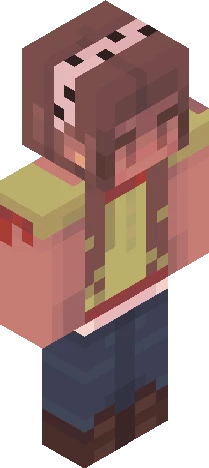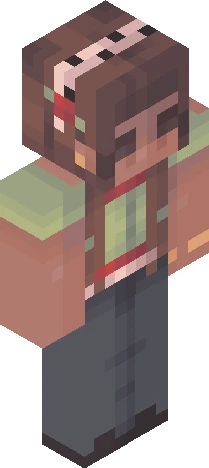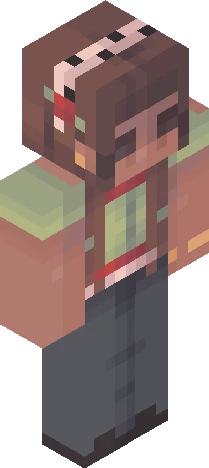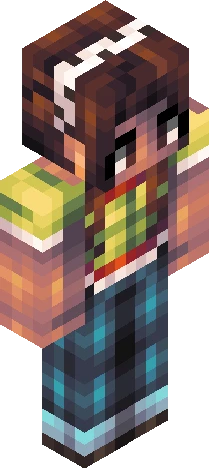
Click and drag to rotate
Kktr05
. apple slices ; r5
by sunkkissed · Minecraft Skins community listing
Free . apple slices ; r5 skin for Minecraft and Eaglercraft. Tagged kktr05, round 4, round four, tourney. Use the 3D preview, remix it in our skin editor, or download the PNG with no watermark.
Uploader notes
show more . + * i hope this one isn't too similar to round three oops guys i hit 10k likes but then i deleted a bunch of skins lmao :P i also downloaded minecraft recently and i think i'm getting the hang of it again... kinda. i'm trying to build like... a coastal britain-core seaside village forever world but it's lowk going terrible oh dear uhh updated leaderboard (after round 4): goyqngi - 119 hamster - 109 laureliss - 109 peonydew - 109 dazzles - 108 glitchpro - 101.5 sunnyshift - 86.5 artyzero - 78.5 honeybee - 73.5 babysheep - 62 vespxr - 57.5 silverstruck - 56 mvngo - 53.5 chickengod - 52 lilladybug - 51.5 eeb - 51 depressedwolf - 51 applecadet - 48.5 cqqkii - 40.5 moonya - 37.5 haerrcat - 30 otteremperor - 29.5 callmemay - 24.5 there's three ppl in second place lmao rules: + pls shade the whole skin + finish the outer layer + hueshifting is allowed + no genderbending + tag it with " KKTR05 " + link ur entry here in the comments skin description (important): + brown hair + dark skin + uhh... green henley with a red and white lace cami underneath... or something + dark wash jeans (baggy? bootcut? idk) + dark shoes ;-; due date: oct 4 aest ok yippee yippee :D
64×64 · classic or slim is detected from the PNG
Added value
What’s on this skin page
Preview, categories, compatibility, and tools on this page — not a bare file mirror.
- Creator
- sunkkissed
- Source
- Minecraft Skins community listing · curated on Eaglercraft Studio
- Format
- 64×64 PNG skin texture
- Model
- Classic or slim (detected from the PNG)
- Compatible with
- Eaglercraft · Minecraft Java · Bedrock (classic skin import)
- Studio tools
- 3D preview · browser editor · avatar maker
- Categories
- Kktr05, round 4, round four, tourney
Download
How to download this free skin
- 1Click Download skin to save the free PNG.
- 2Follow Use in Eaglercraft below for client steps, or import the file in Minecraft Java (Profile → Skins).
- 3Optional: open Avatar maker for a Discord / YouTube profile picture from the same texture.
Downloads are free. An optional account only saves favorites across devices.
Edit
How to edit this skin
- 1Open Edit skin to load this PNG in the browser editor.
- 2Paint, swap layers, or remix parts — changes stay on your device until you download.
- 3Export a new 64×64 PNG and use it in Eaglercraft or Minecraft Java.
Eaglercraft · Minecraft
How to use this skin in Eaglercraft
Download the PNG, then apply it in the Eaglercraft client you already use. Menus differ by host. This site does not distribute the game.
- 1Download the PNG with the button above.
- 2Open your Eaglercraft 1.8 client in the browser.
- 3On the title screen, open Options, then the skin control. It is often named Skin or Change Skin.
- 4Upload this PNG, or paste a direct image link if that menu asks for a URL.
- 5Join a world. The skin stays in this browser for that client.
Standard model · 64×64. We never ask for a game password. A skin file is only artwork.
Use this skin in Minecraft
- 1Download the same PNG.
- 2In the Minecraft Launcher, open Skins and choose a new skin.
- 3Pick classic or slim so the arms match this skin, then upload the file.
- 4Bedrock can use this artwork where that device lets you import a custom skin PNG. The file itself is the standard Java skin layout.
Similar skins
More library skins from related categories — curated for discovery, not random filler.