
タイマーデータパック(1.21.5~1.21.10)
Creator: MattsuDAZE · 2025-12-09 · Data packs · Free on Eaglercraft Studio
Download タイマーデータパック(1.21.5~1.21.10) — free Minecraft data pack. Created by MattsuDAZE. Tagged functions, tool. Drop into your world’s datapacks folder when the archive is available.
Creator notes
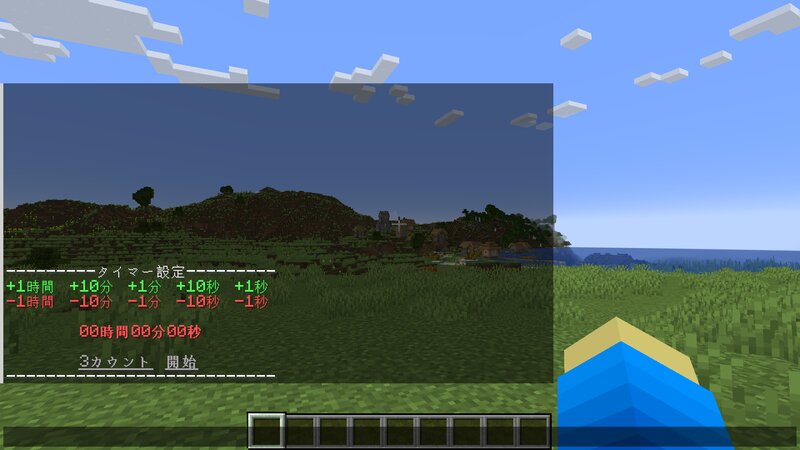
【概要】 Minecraft上でタイマーを動作させるデータパックです。 このデータパックは1.21.5~1.21.10用です!! 1.14~1.20.6は www.planetminecraft.com/data-pack/1-14-1-20-6/ 1.21~1.21.4は https://www.planetminecraft.com/data-pack/1-21-1-21-4/ 1.21.11以降は www.planetminecraft.com/data-pack/1-21-11/ をご使用ください。 【導入方法】 ダウンロードしたzipファイルをそのままデータパックフォルダに入れてください。 ワールドを読み込んだ際、タイマーの操作盤が出てきますので、チャット欄を開き、クリックしてご使用ください。 また、操作盤が出てこない場合、「/reload」をしていただき、それでも出てこない場合、バージョンが対応しているかどうかご確認ください。 このデータパックは単体でも動きますが、1.21.6以降で使用される場合、以下のMODを導入されることを強く推奨します。※1 modrinth.com/mod/disable-click-event-warning 【操作方法】 基本は操作盤を見ていただければ分かると思います。 開始方法については2パターンあり、3カウント後に開始する「3カウント」と、押した瞬間に開始する「開始」です。 開始した後の、「削減」と「追加」というボタンに関しては、設定したタイムだけタイマーを延長したり、縮めたりできるというものです。 また、コマンドでも操作できますが、バグが起こる可能性があるため、特殊な事情がない限り操作盤からの操作を推奨します。 【使用上の注意】 ・他のデータパックと競合する可能性があります。 ・マルチプレイでも使えますが、ランダムで割り振られる[timer]のタグを持っている人が抜けるとタイマーが動作しなくなります。※2 ・改造は自由にしていただいて構いませんが、改造したものを配布することは禁止します。 ・動画や配信での使用は自由ですが、可能な限り概要欄にクレジット表記をお願いします。 ※1:このMODを入れないと、タイマーを使用する際に毎回コマンドの実行確認が起こってしまい、たいへん不便です。 ※2:リロードすれば使えますがタイマーがリセットされ、[timer]のタグを持っている人が再び入るとタイマーが正常に動作しなくなります。その場合もリロードすればリセットされ、再び使えるようになります。(この動作については動作確認をしていないため、実際には動作しなくなる場合があります。)
Added value
What’s included on this page
Preview, categories, compatibility, and tools on this page — not a bare file mirror.
- Creator
- MattsuDAZE
- Source
- Minecraft downloads library on Eaglercraft Studio
- Type
- Minecraft data pack
- Price
- Free download on Eaglercraft Studio
- Curation
- Listed with credit to MattsuDAZE · studio preview & install guide
- Compatible with
- Minecraft Java (match version / loader in facts)
- Tags
- Functions, Tool
Install guide
How to install this free data pack
Data pack listing with creator credit and world-folder install steps.
- 1Download the datapack archive.
- 2Open your world folder → datapacks, and place the zip or folder there.
- 3Run /reload in-game (or reopen the world) to enable it.
Data packs are Java Edition. Match the pack’s game version to avoid broken recipes or worldgen.
Related free data packs
More curated data packs from the same library section.

MoisturePack · 75 diamonds · 6 views

ProGameBot · 46 diamonds · 3 views

sniffercraft34 · 46 diamonds · 1 views

sniffercraft34 · 45 diamonds · 648 views