
Advanced Beacons
Creator: FancyPotatOS · 2025-12-01 · Data packs · Free on Eaglercraft Studio
Download Advanced Beacons — free Minecraft data pack. Created by FancyPotatOS. Tagged absorption, advanced, beacon, beacons. Drop into your world’s datapacks folder when the archive is available.
Creator notes
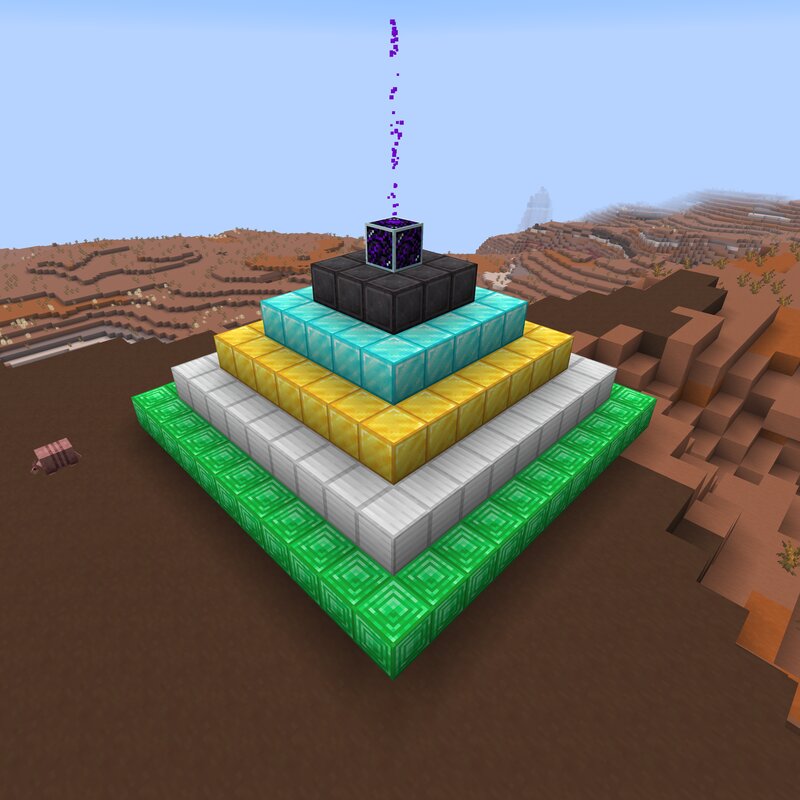
Advanced Beacons Datapack Created by FancyPotatOS Compatible with 26.2 Adds a new beacon to your world! It functions along the same lines, with a block pyramid and the ability to set an Area of Effect. This datapack requires the FancyUI datapack to function correctly. Features Completely Vanilla - No mods required! Simple design - Quick to figure out and easy to install Almost all potion effects - Most potion effects are available yes, even the bad ones.. The only ones not included are: Instant Damage/Health, omen effects, Hero of the Village, and Luck/Unluck The bad effects can be disabled by setting the score config.effects.disable_bad_effects advancedbeacon.master to 1 This doesn't wipe any beacons that have been set, however. Large Range - Beacons now start with a 15 block range and extend by 15 blocks per layer Large Beacon - Some of the best effects are behind the elusive 11x11 pyramid base! That's 285 blocks, or roughly 4 and a half stacks total! No ceiling - Currently, there is no ceiling to the beacon - it can be placed anywhere! Particle Effects - There is a long beam of crying obsidian that comes from the beacon The particle effects can be enabled by setting the score co
Added value
What’s included on this page
Preview, categories, compatibility, and tools on this page — not a bare file mirror.
- Creator
- FancyPotatOS
- Source
- Minecraft downloads library on Eaglercraft Studio
- Type
- Minecraft data pack
- Price
- Free download on Eaglercraft Studio
- Curation
- Listed with credit to FancyPotatOS · studio preview & install guide
- to version
- Minecraft 26.2
- Compatible with
- Minecraft Java (match version / loader in facts)
- Tags
- Absorption, Advanced, Beacon, Beacons, Blindness, Conduit
Install guide
How to install this free data pack
Data pack listing with creator credit and world-folder install steps.
- 1Download the datapack archive.
- 2Open your world folder → datapacks, and place the zip or folder there.
- 3Run /reload in-game (or reopen the world) to enable it.
Data packs are Java Edition. Match the pack’s game version to avoid broken recipes or worldgen.
Related free data packs
More curated data packs from the same library section.

MoisturePack · 75 diamonds · 6 views

ProGameBot · 46 diamonds · 3 views

sniffercraft34 · 46 diamonds · 1 views

sniffercraft34 · 45 diamonds · 648 views