
All The Furniture - Java Edition!
Creator: Foreverpal · 2026-09-18 · Data packs · Free on Eaglercraft Studio
Download All The Furniture - Java Edition! — free Minecraft data pack. Created by Foreverpal. Tagged cosmetic, decoration, functions, furniture. Drop into your world’s datapacks folder when the archive is available.
Creator notes
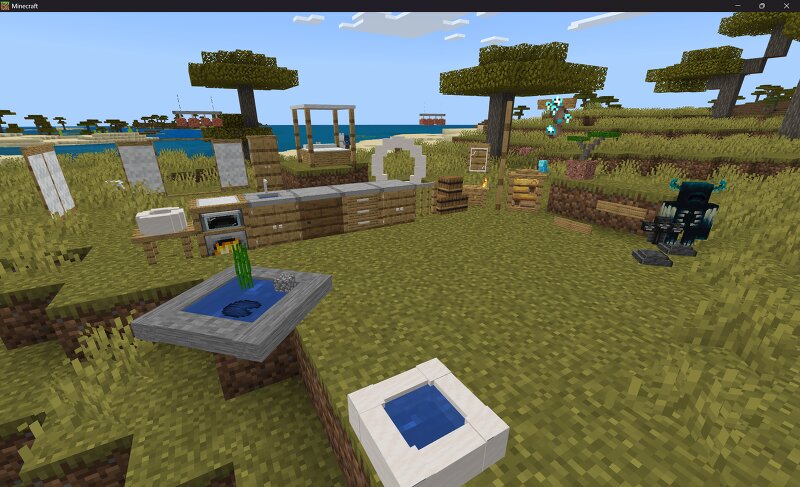
All The Furniture! Please! If you have any builds or ideas you have created with the Datapack please feel free to send them to my server on discord! I would love to see what others have built with the datapack! Maybe even planning on doing contests in the future... 247 pieces of furniture you can actually arrange. Place it, turn it, restyle it, tilt it, scale it, stack things on it, then pick it back up with every setting remembered. Available for Minecraft: Java Edition as a data pack and for Bedrock Edition as an add-on. Same furniture, same controls, same features on both. Getting started First, craft the Furnishing Catalogue . It's just one Book and one Log of any kind. This is the shop, and everything comes from here. Open it, pick a shelf, pick a piece. In Survival each piece lists what it costs and takes those materials from your inventory when you choose it. Woods are priced as a family, so any six logs pay a six-log price and they don't have to match. In Creative everything is free and every piece is shown. Place the piece down, then sneak and right-click it to open the Manage menu. The one thing to remember: Right-click : means use it. Sit on a chair, open a cabinet. Snea
Added value
What’s included on this page
Preview, categories, compatibility, and tools on this page — not a bare file mirror.
- Creator
- Foreverpal
- Source
- Minecraft downloads library on Eaglercraft Studio
- Type
- Minecraft data pack
- Price
- Free download on Eaglercraft Studio
- Curation
- Listed with credit to Foreverpal · studio preview & install guide
- Compatible with
- Minecraft Java (match version / loader in facts)
- Tags
- Cosmetic, Decoration, Functions, Furniture, Recipes
Install guide
How to install this free data pack
Data pack listing with creator credit and world-folder install steps.
- 1Download the datapack archive.
- 2Open your world folder → datapacks, and place the zip or folder there.
- 3Run /reload in-game (or reopen the world) to enable it.
Data packs are Java Edition. Match the pack’s game version to avoid broken recipes or worldgen.
Related free data packs
More curated data packs from the same library section.

MoisturePack · 75 diamonds · 6 views

ProGameBot · 46 diamonds · 3 views

sniffercraft34 · 46 diamonds · 1 views

sniffercraft34 · 45 diamonds · 648 views