
Cabinet of Curiosities
Creator: Democrite973 · 2026-07-09 · Data packs · Free on Eaglercraft Studio
Download Cabinet of Curiosities — free Minecraft data pack. Created by Democrite973. Tagged cosmetic, display, functions, survival. Drop into your world’s datapacks folder when the archive is available.
Creator notes
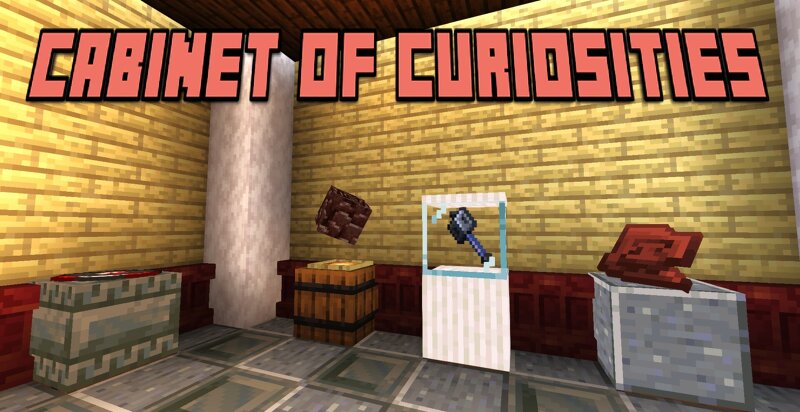
Cabinet of curiosities is a survival friendly datapack allowing you to create beautiful and customizable displays for your favorite and rarest items! Your rarest and coolest items deserve more than being displayed in a simple item frame. With Cabinet of Curiosities, exhibit your items in a cool and survival friendly way to make them shine. To create a display, place a barrel and a glow item frame on top. Right-click the item frame and simply navigate the menu to modify the display. The item(s) placed in the barrel will be displayed according to your customisation choices. Customizations available: - Display type: Centered, on ground, isometric (for 3D items) or leaned on the wall. - Display modifiers: Change the height, size, orientation and luminosity of your display. - Rotation: Allows your display to rotate on X, Y or Z axis. - Multi-displays: Display multiple items with the same display, with customizable item swapping. - Pedestal settings: Disguise barrel as any block in your possession, hide the item frame and/or encase your display in glass.
Added value
What’s included on this page
Preview, categories, compatibility, and tools on this page — not a bare file mirror.
- Creator
- Democrite973
- Source
- Minecraft downloads library on Eaglercraft Studio
- Type
- Minecraft data pack
- Price
- Free download on Eaglercraft Studio
- Curation
- Listed with credit to Democrite973 · studio preview & install guide
- to version
- Minecraft 26.3 snapshot
- Compatible with
- Minecraft Java (match version / loader in facts)
- Tags
- Cosmetic, Display, Functions, Survival, Vanilla
Install guide
How to install this free data pack
Data pack listing with creator credit and world-folder install steps.
- 1Download the datapack archive.
- 2Open your world folder → datapacks, and place the zip or folder there.
- 3Run /reload in-game (or reopen the world) to enable it.
Data packs are Java Edition. Match the pack’s game version to avoid broken recipes or worldgen.
Related free data packs
More curated data packs from the same library section.

MoisturePack · 75 diamonds · 6 views

ProGameBot · 46 diamonds · 3 views

sniffercraft34 · 46 diamonds · 1 views

sniffercraft34 · 45 diamonds · 648 views