
Cal's Simple Portals
Creator: CalTheUntitled · 2026-08-04 · Data packs · Free on Eaglercraft Studio
Download Cal's Simple Portals — free Minecraft data pack. Created by CalTheUntitled. Tagged advancements, fast travel, functions, late game. Drop into your world’s datapacks folder when the archive is available.
Creator notes
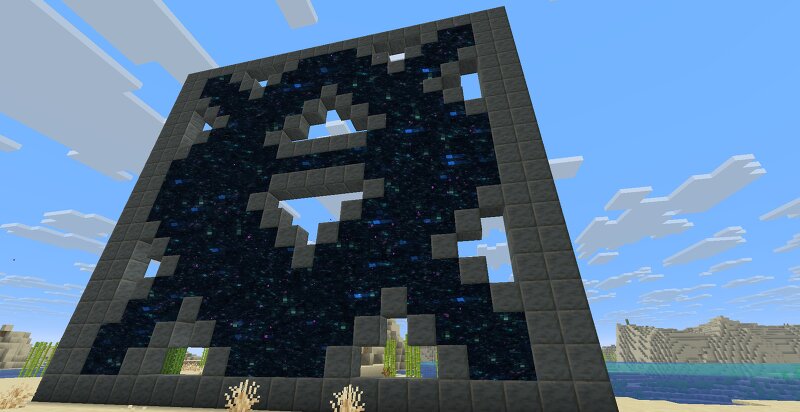
Create one-way portals over any distance in survival. To make a portal, craft an Unlinked Portal Key (see screenshots for recipe), use it on any block in the world to link it to a destination, then use it inside a portal frame to open a portal. Portals can transport players and other entities over any distance, but they do not allow for travel between dimensions. Portal frames can be almost any shape (either horizontal like an end portal or vertical like a nether portal), so long as they are fully enclosed and no part of the portal is more than ~12 blocks from the activation point. Portal frames can be made out of any combination of the following: Obsidian Crying obsidian Amethyst blocks Polished Tuff Chiseled Tuff Chiseled Tuff Bricks Tuff Bricks If a portal frame is broken, the portal will deactivate shortly after, returning the portal key. Throwing a Linked Portal Key into lava (or a cauldron full of lava) and leaving it for 5 seconds will un-link it, allowing you to choose a new destination. This pack should be safe to add to existing worlds and servers. If this pack is removed, any existing portals will continue to function, but breaking the frame around a portal will no longe
Added value
What’s included on this page
Preview, categories, compatibility, and tools on this page — not a bare file mirror.
- Creator
- CalTheUntitled
- Source
- Minecraft downloads library on Eaglercraft Studio
- Type
- Minecraft data pack
- Price
- Free download on Eaglercraft Studio
- Curation
- Listed with credit to CalTheUntitled · studio preview & install guide
- to version
- Minecraft 26.2
- Compatible with
- Minecraft Java (match version / loader in facts)
- Tags
- Advancements, Fast Travel, Functions, Late Game, Portal, Quality Of Life
Install guide
How to install this free data pack
Data pack listing with creator credit and world-folder install steps.
- 1Download the datapack archive.
- 2Open your world folder → datapacks, and place the zip or folder there.
- 3Run /reload in-game (or reopen the world) to enable it.
Data packs are Java Edition. Match the pack’s game version to avoid broken recipes or worldgen.
Related free data packs
More curated data packs from the same library section.

MoisturePack · 75 diamonds · 6 views

ProGameBot · 46 diamonds · 3 views

sniffercraft34 · 46 diamonds · 1 views

sniffercraft34 · 45 diamonds · 648 views