
Colored Lighting
Creator: ThirtyFangs · 2026-04-10 · Data packs · Free on Eaglercraft Studio
Download Colored Lighting — free Minecraft data pack. Created by ThirtyFangs. Tagged quality of life. Drop into your world’s datapacks folder when the archive is available.
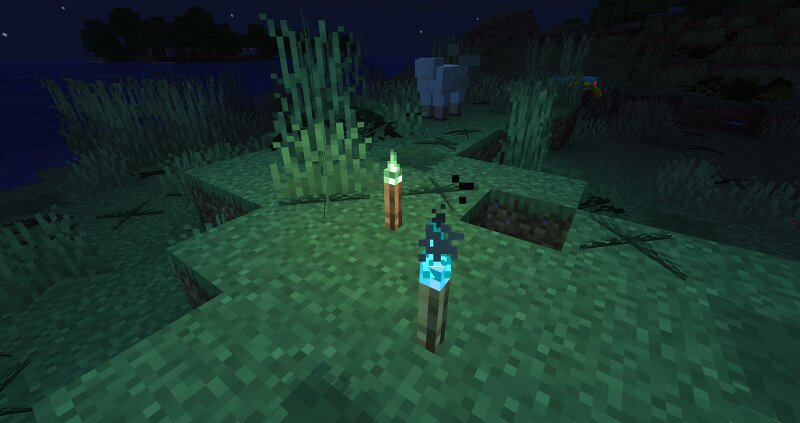
Creator notes
Colored Lighting This datapack makes it possible to customize the lighting of your builds based on the light source you are using to decorate it. Old preview (test version, it's smoother now and doesn't have text, the orange is also less red) Visual limitations If a block emit a specific light, it will only be visible if you are 15 blocks close If 2 differents colored light sources are close, both light source will emit the color of the closer light source. If you use this datapack on an already generated world, you will need to manually get close to each light to trigger the colored lighting More details The datapack relies on custom biomes to use custom block light tint, which means that if a block emit a specific light, it will only be visible if you are 15 blocks close (or in the said biome) (which will automatically be set if someone get close the light block once). It also means that if 2 differents light sources are close (campfire & soul campfire for example), the color you will see emitting from both light source will be depending on which light source you are closer to. If you use this datapack on an already generated world, you will need to manually get close to each lig
Added value
What’s included on this page
Preview, categories, compatibility, and tools on this page — not a bare file mirror.
- Creator
- ThirtyFangs
- Source
- Minecraft downloads library on Eaglercraft Studio
- Type
- Minecraft data pack
- Price
- Free download on Eaglercraft Studio
- Curation
- Listed with credit to ThirtyFangs · studio preview & install guide
- to version
- Minecraft 26.2
- Compatible with
- Minecraft Java (match version / loader in facts)
- Tags
- Quality Of Life
Install guide
How to install this free data pack
Data pack listing with creator credit and world-folder install steps.
- 1Download the datapack archive.
- 2Open your world folder → datapacks, and place the zip or folder there.
- 3Run /reload in-game (or reopen the world) to enable it.
Data packs are Java Edition. Match the pack’s game version to avoid broken recipes or worldgen.
Related free data packs
More curated data packs from the same library section.

MoisturePack · 75 diamonds · 6 views

ProGameBot · 46 diamonds · 3 views

sniffercraft34 · 46 diamonds · 1 views

sniffercraft34 · 45 diamonds · 648 views