
Craftable Skeleton Skulls UPDATED
Creator: ImDoinItWell · 2026-08-08 · Data packs · Free on Eaglercraft Studio
Download Craftable Skeleton Skulls UPDATED — free Minecraft data pack. Created by ImDoinItWell. Tagged crafting, datapack, latest, other. Drop into your world’s datapacks folder when the archive is available.
Creator notes
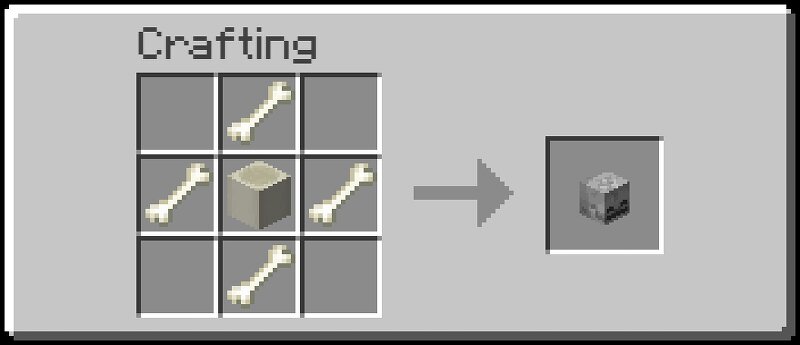
More Skulls A simple Minecraft datapack that adds recipes for crafting Skeleton Skulls and Wither Skeleton Skulls! 💀 Features Craft Skeleton Skulls using Bones and a Bone Block Craft Wither Skeleton Skulls using a Skeleton Skull and Coal Works with the normal crafting table No mods or plugins required Lightweight and simple Compatible with Minecraft 26.2 📦 Recipes Skeleton Skull 1 Bone Block + 4 Bones → 1 Skeleton Skull The Bone Block goes in the center, with one Bone on each side. Wither Skeleton Skull 1 Skeleton Skull + 4 Coal → 1 Wither Skeleton Skull The Skeleton Skull goes in the center, with one Coal on each side. 💡 Why? This datapack makes Skeleton Skulls and Wither Skeleton Skulls easier to obtain without relying entirely on mob drops. It's especially useful for survival players, builders, collectors, and players who want easier access to skulls for decoration and other projects. ⚙️ Installation Place the datapack's .zip file into your world's datapacks folder, then reload the world or run /reload . No resource pack is required. 🛠️ Compatibility Minecraft 26.2 Vanilla-friendly — no mods or plugins required.
Added value
What’s included on this page
Preview, categories, compatibility, and tools on this page — not a bare file mirror.
- Creator
- ImDoinItWell
- Source
- Minecraft downloads library on Eaglercraft Studio
- Type
- Minecraft data pack
- Price
- Free download on Eaglercraft Studio
- Curation
- Listed with credit to ImDoinItWell · studio preview & install guide
- Compatible with
- Minecraft Java (match version / loader in facts)
- Tags
- Crafting, Datapack, Latest, Other, Recipes, Recipie
Install guide
How to install this free data pack
Data pack listing with creator credit and world-folder install steps.
- 1Download the datapack archive.
- 2Open your world folder → datapacks, and place the zip or folder there.
- 3Run /reload in-game (or reopen the world) to enable it.
Data packs are Java Edition. Match the pack’s game version to avoid broken recipes or worldgen.
Related free data packs
More curated data packs from the same library section.

MoisturePack · 75 diamonds · 6 views

ProGameBot · 46 diamonds · 3 views

sniffercraft34 · 46 diamonds · 1 views

sniffercraft34 · 45 diamonds · 648 views