
Cursed throwable TNT using quaternions
Creator: the der discohund · 2026-09-02 · Data packs · Free on Eaglercraft Studio
Download Cursed throwable TNT using quaternions — free Minecraft data pack. Created by the der discohund. Tagged advancements, functions, loot tables, recipes. Drop into your world’s datapacks folder when the archive is available.
Creator notes
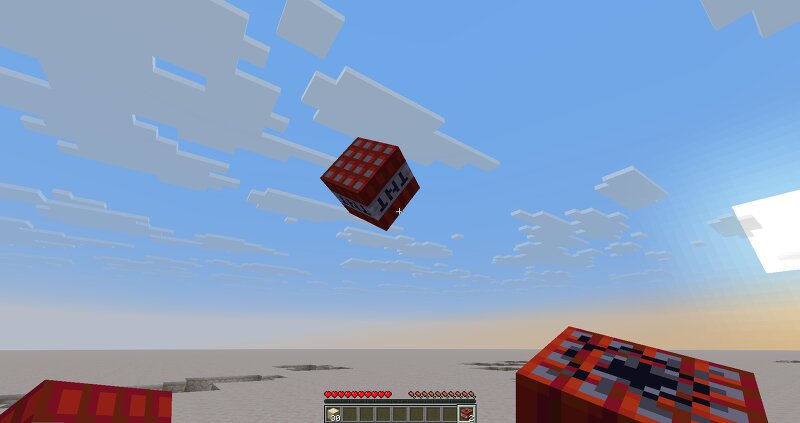
Use right-click on any TNT item to throw it, and it will follow you around. Only works for TNT that is crafted, mined or found in your world, so if you got it in your inventory before the data pack was installed or if you got it directly from the creative menu, you have to place and break the TNT first. This data pack is meant as a demo for the quaternion math using the new /compute command. As such, I made sure to write the code in a way that it is easy to learn from . The code also contains some easily re-usable math functions that you can free to copy into your own projects , as long as you make sure I'm credited for those parts. For example, the logic that rotates the TNT in this data pack looks like this: In this, the only part specific to this project is the get_axis_angle function. Actually rotating the entity is handled by all of the math that you can see right here! If you have any questions, feel free to ask me on Discord.
Added value
What’s included on this page
Preview, categories, compatibility, and tools on this page — not a bare file mirror.
- Creator
- the der discohund
- Source
- Minecraft downloads library on Eaglercraft Studio
- Type
- Minecraft data pack
- Price
- Free download on Eaglercraft Studio
- Curation
- Listed with credit to the der discohund · studio preview & install guide
- Compatible with
- Minecraft Java (match version / loader in facts)
- Tags
- Advancements, Functions, Loot Tables, Recipes, Simple
Install guide
How to install this free data pack
Data pack listing with creator credit and world-folder install steps.
- 1Download the datapack archive.
- 2Open your world folder → datapacks, and place the zip or folder there.
- 3Run /reload in-game (or reopen the world) to enable it.
Data packs are Java Edition. Match the pack’s game version to avoid broken recipes or worldgen.
Related free data packs
More curated data packs from the same library section.

MoisturePack · 75 diamonds · 6 views

ProGameBot · 46 diamonds · 3 views

sniffercraft34 · 46 diamonds · 1 views

sniffercraft34 · 45 diamonds · 648 views