
Damage Indicator | Health Visibility Utility
Creator: ManaMage · 2026-05-18 · Data packs · Free on Eaglercraft Studio
Download Damage Indicator | Health Visibility Utility — free Minecraft data pack. Created by ManaMage. Tagged bossbar, combat, damage, damageindicator. Drop into your world’s datapacks folder when the archive is available.
Creator notes
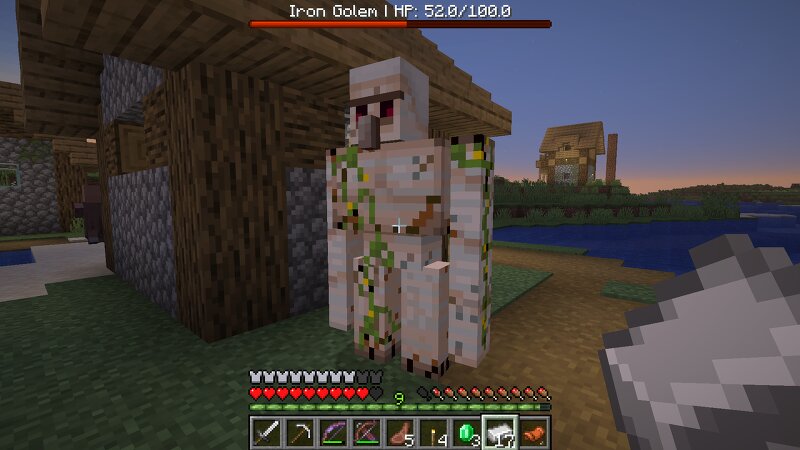
Damage Indicator YS Never guess how much health a mob has left again. Damage Indicator adds clean, vanilla-friendly health bars so combat feels more readable without turning Minecraft into a modded mess. Damage Indicator YS is a lightweight vanilla Minecraft datapack that shows a clean red bossbar for your current target. Instead of filling the screen with floating health text over every nearby mob, Damage Indicator YS focuses only on the entity you are actively looking at. The goal is simple: readable health feedback without cluttering the vanilla Minecraft experience. Features Focused bossbar display - Shows health only for the entity you are looking at. Target name and HP - Displays the entity’s name, current health, and max health. Damage feedback - Shows recent damage as Damaged -X . Healing feedback - Shows recent healing as Healed +X . Death feedback - Briefly shows 0 HP when a tracked entity dies. Multiplayer-friendly - Uses a per-player bossbar system. Optional player targeting - Player health display exists but is disabled by default. No resource pack required - Works as a vanilla datapack. Focus Mode Design Damage Indicator YS is designed as a low-clutter alternative to
Added value
What’s included on this page
Preview, categories, compatibility, and tools on this page — not a bare file mirror.
- Creator
- ManaMage
- Source
- Minecraft downloads library on Eaglercraft Studio
- Type
- Minecraft data pack
- Price
- Free download on Eaglercraft Studio
- Curation
- Listed with credit to ManaMage · studio preview & install guide
- Compatible with
- Minecraft Java (match version / loader in facts)
- Tags
- Bossbar, Combat, Damage, Damageindicator, Datapack, Functions
Install guide
How to install this free data pack
Data pack listing with creator credit and world-folder install steps.
- 1Download the datapack archive.
- 2Open your world folder → datapacks, and place the zip or folder there.
- 3Run /reload in-game (or reopen the world) to enable it.
Data packs are Java Edition. Match the pack’s game version to avoid broken recipes or worldgen.
Related free data packs
More curated data packs from the same library section.

MoisturePack · 75 diamonds · 6 views

ProGameBot · 46 diamonds · 3 views

sniffercraft34 · 46 diamonds · 1 views

sniffercraft34 · 45 diamonds · 648 views