
Dynamics seasons and crop cycle
Creator: Error6119 · 2026-09-20 · Data packs · Free on Eaglercraft Studio
Download Dynamics seasons and crop cycle — free Minecraft data pack. Created by Error6119. Tagged quality of life. Drop into your world’s datapacks folder when the archive is available.
Creator notes
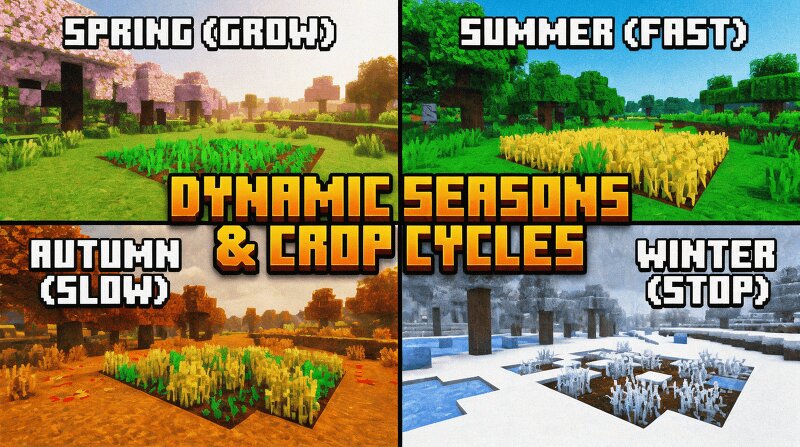
# 🌍 Dynamic Seasons & Crop Cycles - Vanilla Survival Evolved Make your Minecraft survival the closest to a true, living ecosystem it can possibly get! The four seasons in this datapack will automatically trigger, forcing you to entirely change and develop your entire farming strategy. How will you hoard wheat in abundance during the warm Summer months? Will you completely starve when the harshest season- Winter- locks you completely out of any food development? **⚙️ Core Seasonal Mechanics** Automatically every 7 real-life days, the seasons will completely and fluidly transition, the player will have to change his survival tactics so he doesn't completely "bite it": **🌸 Spring (1-7th of all days):** The world will spring forth; crops will grow at normal, default speed like they do at the moment and it will be the perfect season to go dig up farmland and build your very first farms! **☀️ Summer (8-14th of all days):** The "get a huge amount of food right now" period! Your crops' growth rate is about 2x faster making it the only period where food will sprout extremely fast, the ideal month to stock up so you are ready during Summer. You may find your livestock are better breeders too
Added value
What’s included on this page
Preview, categories, compatibility, and tools on this page — not a bare file mirror.
- Creator
- Error6119
- Source
- Minecraft downloads library on Eaglercraft Studio
- Type
- Minecraft data pack
- Price
- Free download on Eaglercraft Studio
- Curation
- Listed with credit to Error6119 · studio preview & install guide
- to version
- Minecraft 26.2
- Compatible with
- Minecraft Java (match version / loader in facts)
- Tags
- Quality Of Life
Install guide
How to install this free data pack
Data pack listing with creator credit and world-folder install steps.
- 1Download the datapack archive.
- 2Open your world folder → datapacks, and place the zip or folder there.
- 3Run /reload in-game (or reopen the world) to enable it.
Data packs are Java Edition. Match the pack’s game version to avoid broken recipes or worldgen.
Related free data packs
More curated data packs from the same library section.

MoisturePack · 75 diamonds · 6 views

ProGameBot · 46 diamonds · 3 views

sniffercraft34 · 46 diamonds · 1 views

sniffercraft34 · 45 diamonds · 648 views