
EasyEnchant | Developer Enchantment Utility
Creator: ManaMage · 2026-06-03 · Data packs · Free on Eaglercraft Studio
Download EasyEnchant | Developer Enchantment Utility — free Minecraft data pack. Created by ManaMage. Tagged armor, commands, datapack, developer. Drop into your world’s datapacks folder when the archive is available.
Creator notes
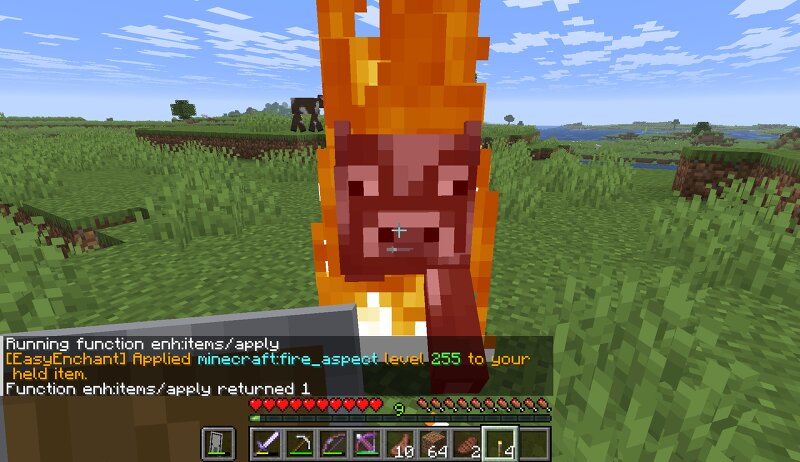
EasyEnchant EasyEnchant is a Minecraft Java datapack developer utility created by ManaMage and released under Yazsras Studios. This datapack lets you apply any valid enchantment at any level to the item in your main hand. It was built for datapack creators, map makers, creative testing worlds, and controlled servers where fast item testing matters. Instead of building long custom [icode]/give[/icode] commands or fighting vanilla [icode]/enchant[/icode] restrictions, you can hold an item and run one function command. Main Command /function enh:items/apply {id:"minecraft:fire_aspect",level:50} Example: /function enh:items/apply {id:"minecraft:fire_aspect",level:255} This can apply Fire Aspect 255 to the item you are holding, even if that item is normally not enchantable that way. What EasyEnchant Is For Testing custom datapack items Testing weapons, tools, armor, and unusual held items Testing enchantment scaling Testing high-level enchantment behavior Testing Minecraft item-component behavior Quickly creating extreme test items Avoiding long custom item commands Bypassing vanilla [icode]/enchant [/icode] restrictions for development use Included Commands Apply an Enchantment /
Added value
What’s included on this page
Preview, categories, compatibility, and tools on this page — not a bare file mirror.
- Creator
- ManaMage
- Source
- Minecraft downloads library on Eaglercraft Studio
- Type
- Minecraft data pack
- Price
- Free download on Eaglercraft Studio
- Curation
- Listed with credit to ManaMage · studio preview & install guide
- Compatible with
- Minecraft Java (match version / loader in facts)
- Tags
- Armor, Commands, Datapack, Developer, Easyenchant, Enchant
Install guide
How to install this free data pack
Data pack listing with creator credit and world-folder install steps.
- 1Download the datapack archive.
- 2Open your world folder → datapacks, and place the zip or folder there.
- 3Run /reload in-game (or reopen the world) to enable it.
Data packs are Java Edition. Match the pack’s game version to avoid broken recipes or worldgen.
Related free data packs
More curated data packs from the same library section.

MoisturePack · 75 diamonds · 6 views

ProGameBot · 46 diamonds · 3 views

sniffercraft34 · 46 diamonds · 1 views

sniffercraft34 · 45 diamonds · 648 views