
Equipment Refinement
Creator: MC_Ninja38 · 2026-01-21 · Data packs · Free on Eaglercraft Studio
Download Equipment Refinement — free Minecraft data pack. Created by MC_Ninja38. Tagged advancements, armor, functions, improvements. Drop into your world’s datapacks folder when the archive is available.
Creator notes
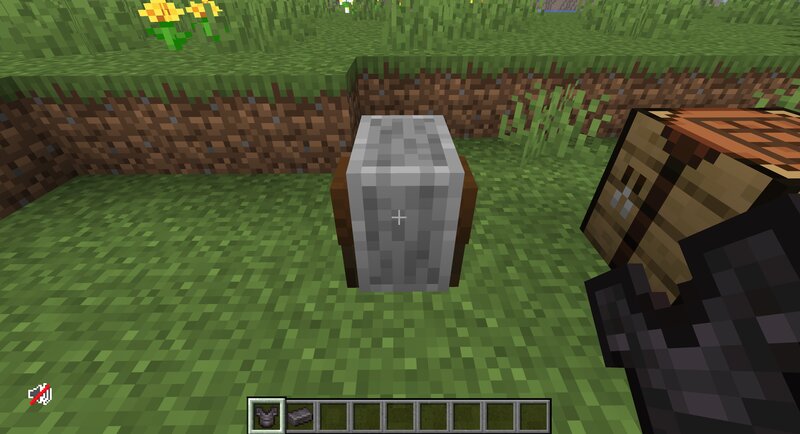
Welcome to the Equipment Refinement Datapack Tired of burning through XP for Repairs and Enchanting? Well look no further! Equipment Refinement reimagines the XP and Equipment Improvement system entirely! What it does: All repair and improvement is done at the Grindstone, rather than Anvils or Enchanting tables: -Repairs only cost the necessary repair material XP Level is used as an Improvement Proficiency stat, rather than Enchantment Currency: - Every 10 levels = 1 Proficiency Point (Up to 10 Max) - Armor gets Protection Level equal to Proficiency Level - Melee Weapons get Sharpness equal to Proficiency Level - Ranged Weapons get Power equal to Proficiency Level - Tools get Efficiency equal to Proficiency Level - Extra enchantments based on Proficiency Level Ranges and/or Required Items All arrows fired (even by Skeletons) are 2x Velocity, to make arrows feel more realistic Watch the Tutorial Video to see it in action! Supported Versions: This datapack will only be compatible with 1.21.9 and newer Equipment Refinement © 2026 by MC_Ninja38 is licensed under CC BY-NC-ND 4.0. To view a copy of this license, visit creativecommons.org/licenses/by-nc-nd/4.0/
Added value
What’s included on this page
Preview, categories, compatibility, and tools on this page — not a bare file mirror.
- Creator
- MC_Ninja38
- Source
- Minecraft downloads library on Eaglercraft Studio
- Type
- Minecraft data pack
- Price
- Free download on Eaglercraft Studio
- Curation
- Listed with credit to MC_Ninja38 · studio preview & install guide
- Compatible with
- Minecraft Java (match version / loader in facts)
- Tags
- Advancements, Armor, Functions, Improvements, Quality Of Life, Qualityoflife
Install guide
How to install this free data pack
Data pack listing with creator credit and world-folder install steps.
- 1Download the datapack archive.
- 2Open your world folder → datapacks, and place the zip or folder there.
- 3Run /reload in-game (or reopen the world) to enable it.
Data packs are Java Edition. Match the pack’s game version to avoid broken recipes or worldgen.
Related free data packs
More curated data packs from the same library section.

MoisturePack · 75 diamonds · 6 views

ProGameBot · 46 diamonds · 3 views

sniffercraft34 · 46 diamonds · 1 views

sniffercraft34 · 45 diamonds · 648 views