
GD3door | Animated 3x3 Display Door 🚪
Creator: FrogInMyCPU · 2026-04-02 · Data packs · Free on Eaglercraft Studio
Download GD3door | Animated 3x3 Display Door 🚪 — free Minecraft data pack. Created by FrogInMyCPU. Tagged door, sliding, technology. Drop into your world’s datapacks folder when the archive is available.
Creator notes
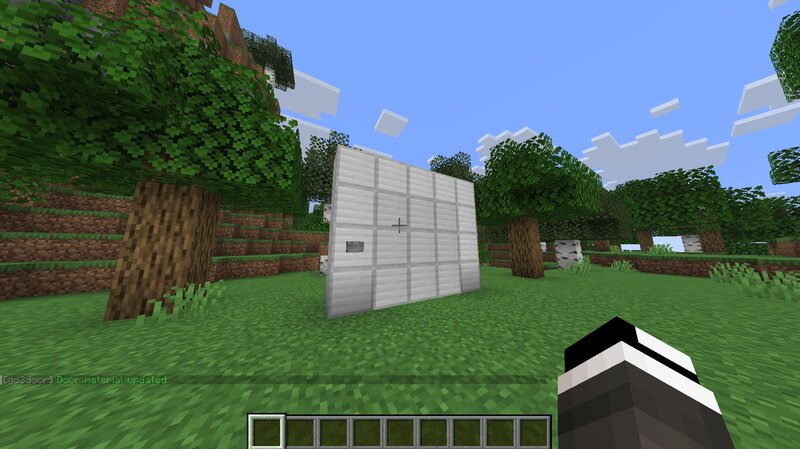
🐸💻 gd3door by Frog In My CPU gd3door is a highly customizable 3×3 animated door system 🚪 built entirely with datapack mechanics and display entities. It creates smooth, satisfying motion that feels far beyond vanilla while staying lightweight and easy to use ⚙️ With a single command, you can generate a grid-aligned door that opens with fluid animation, maintains proper collision using invisible hitboxes 🟪, and blends seamlessly into your builds 🧱 The real magic ✨ comes from customization. Simply drop a block onto the door and it instantly reskins itself, turning ordinary walls into hidden gates and secret entrances 🕳️ gd3door also supports experimental (and slightly cursed 😈) styles, including real mob-based living walls 🧟♂️ that dosen't work at the moment... It’s weird. It’s funny. It’s amazing. 🔥 Features 🚪 Smooth animated opening and closing 🟪 Invisible collision using shulkers (no drops, no mess) 🔇 Silent operation with optional visual effects ✨ Particle effects for magic, tech, or mechanical vibes 💬 Chat-based control menu for easy use 🧱 Throw blocks to instantly reskin your door 🧟 Mob wall modes (because why not) STRICTLY 26.1 ⚠️
Added value
What’s included on this page
Preview, categories, compatibility, and tools on this page — not a bare file mirror.
- Creator
- FrogInMyCPU
- Source
- Minecraft downloads library on Eaglercraft Studio
- Type
- Minecraft data pack
- Price
- Free download on Eaglercraft Studio
- Curation
- Listed with credit to FrogInMyCPU · studio preview & install guide
- Compatible with
- Minecraft Java (match version / loader in facts)
- Tags
- Door, Sliding, Technology
Install guide
How to install this free data pack
Data pack listing with creator credit and world-folder install steps.
- 1Download the datapack archive.
- 2Open your world folder → datapacks, and place the zip or folder there.
- 3Run /reload in-game (or reopen the world) to enable it.
Data packs are Java Edition. Match the pack’s game version to avoid broken recipes or worldgen.
Related free data packs
More curated data packs from the same library section.

MoisturePack · 75 diamonds · 6 views

ProGameBot · 46 diamonds · 3 views

sniffercraft34 · 46 diamonds · 1 views

sniffercraft34 · 45 diamonds · 648 views