
Green Dappled Forest Grass
Creator: directionless_dreamer · 2026-07-18 · Data packs · Free on Eaglercraft Studio
Download Green Dappled Forest Grass — free Minecraft data pack. Created by directionless_dreamer. Tagged dappled, forest, grass, world generation. Drop into your world’s datapacks folder when the archive is available.
Creator notes
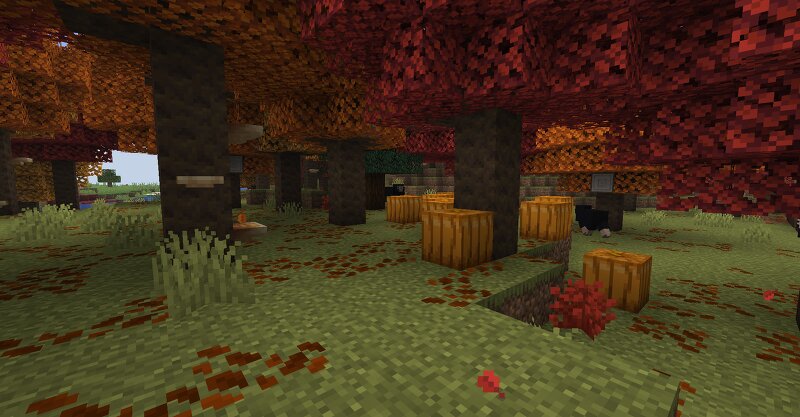
Coded and tested only on the 26.3 Snapshot-4 version! (Mojang changed the syntax for the worldgen files, so it shouldn't be compatible with other 26.3 snapshots) • The datapack changes the color of grass in Dappled Forests to warm, olive green , letting it blend well with other adjacent biomes. Foliage is left default orange color. The grass category includes grass blocks, short and tall grass, sugar cane and regular bushes, and foliage category - tree leaves of oak, jungle, acacia, dark oak and mangrove. • Poplar tree generation is now denser and fallen logs generate much rarer. As a side effect it allows hostile mobs to spawn under tree canopies during the day. • Pumpkin patches, regular and sweet berry bushes are now able to generate in this biome. (yes, pumpkins do NOT generate in vanilla Dappled Forests) • Surface lava lakes and streams no longer generate there to prevent annoying forest fires. Installation: as usual - drag and drop .zip archive into the datapack selection menu upon the world creation or into the datapack folder inside your particular, already existing save folder. As for the latter, note that the datapack won't change already generated chunks, including grass
Added value
What’s included on this page
Preview, categories, compatibility, and tools on this page — not a bare file mirror.
- Creator
- directionless_dreamer
- Source
- Minecraft downloads library on Eaglercraft Studio
- Type
- Minecraft data pack
- Price
- Free download on Eaglercraft Studio
- Curation
- Listed with credit to directionless_dreamer · studio preview & install guide
- Compatible with
- Minecraft Java (match version / loader in facts)
- Tags
- Dappled, Forest, Grass, World Generation
Install guide
How to install this free data pack
Data pack listing with creator credit and world-folder install steps.
- 1Download the datapack archive.
- 2Open your world folder → datapacks, and place the zip or folder there.
- 3Run /reload in-game (or reopen the world) to enable it.
Data packs are Java Edition. Match the pack’s game version to avoid broken recipes or worldgen.
Related free data packs
More curated data packs from the same library section.

MoisturePack · 75 diamonds · 6 views

ProGameBot · 46 diamonds · 3 views

sniffercraft34 · 46 diamonds · 1 views

sniffercraft34 · 45 diamonds · 648 views