
Gym for game
Creator: cota5 · 2026-08-08 · Data packs · Free on Eaglercraft Studio
Download Gym for game — free Minecraft data pack. Created by cota5. Tagged datapack, datapacks, for, function. Drop into your world’s datapacks folder when the archive is available.
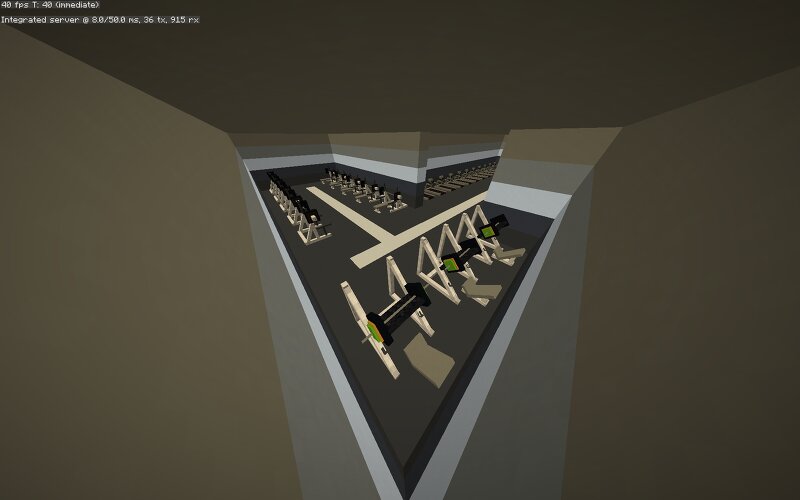
Creator notes
This data pack will add a gym to your world. You can access it with a command. Here, you can make your character stronger, faster, and more resilient. To start a workout, simply right-click on the desired gym. However, remember that exercise consumes hunger, and you must take rest breaks between sets. To access the gym, enter the command /trigger Tp_To_GYM The stats provided by gyms increase gradually, so to achieve high stats, you will need to exercise regularly. Upon death, all active stats are reset, but any accumulated progress is retained. To restore your stats, simply exercise again. For the correct display of the gym models, it is recommended to play with a stable internet connection, as they use player heads. If the appearance of the gyms is not important to you, you can ignore this. To exit the gym, approach the back exit – you will be teleported to your spawn point or to your bed. Machines and their bonuses: Bench Press +3 armor +2 size +4 digging speed +3 maximum health +3 knockback resistance Cost: -2 hunger Leg Press +2 armor +1 size +2 maximum health +1 knockback resistance +3 jump power +3 fall damage reduction Cost: -1 hunger Squat +1 armor +1 size +3 maximum health
Added value
What’s included on this page
Preview, categories, compatibility, and tools on this page — not a bare file mirror.
- Creator
- cota5
- Source
- Minecraft downloads library on Eaglercraft Studio
- Type
- Minecraft data pack
- Price
- Free download on Eaglercraft Studio
- Curation
- Listed with credit to cota5 · studio preview & install guide
- to version
- Minecraft 26.2
- Compatible with
- Minecraft Java (match version / loader in facts)
- Tags
- Datapack, Datapacks, For, Function, Functions, Game
Install guide
How to install this free data pack
Data pack listing with creator credit and world-folder install steps.
- 1Download the datapack archive.
- 2Open your world folder → datapacks, and place the zip or folder there.
- 3Run /reload in-game (or reopen the world) to enable it.
Data packs are Java Edition. Match the pack’s game version to avoid broken recipes or worldgen.
Related free data packs
More curated data packs from the same library section.

MoisturePack · 75 diamonds · 6 views

ProGameBot · 46 diamonds · 3 views

sniffercraft34 · 46 diamonds · 1 views

sniffercraft34 · 45 diamonds · 648 views