
HydraGateway Application (Bedrock/Gyser)
Creator: R-E-D-Knight · 2026-09-19 · Data packs · Free on Eaglercraft Studio
Download HydraGateway Application (Bedrock/Gyser) — free Minecraft data pack. Created by R-E-D-Knight. Tagged bedrock, functions, lobby, minecraft. Drop into your world’s datapacks folder when the archive is available.
Creator notes
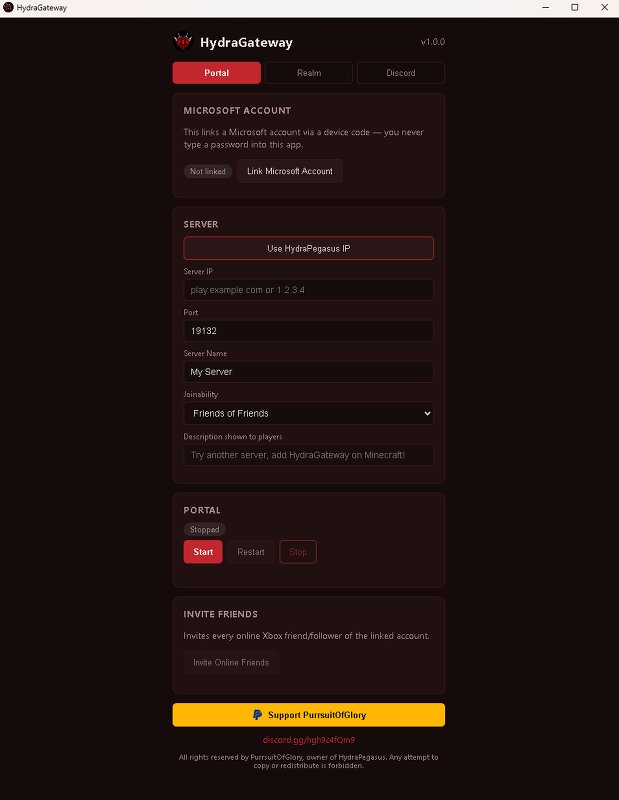
🐉 HydraGateway portal Host your Minecraft Bedrock server via an Xbox profile, no port forwarding, no fuss. Let players find and join your server straight from their Minecraft friends list . Fill in your IP and port, link a Microsoft account, press Start . Done. What it does ✅ Join from the friends list. Players add your host account and your server shows up as a joinable game. ✅ One click invites. Invite every online friend at once, and auto add-back for anyone who follows you. ✅ Restart without closing. Start, stop or restart the portal while the app stays open. ✅ Control it from Discord. Paste your own bot token and get /start and /restart in your server. ✅ Realm mode. Players join your Realm, get invited to your server automatically, and type invite in chat to be invited again. It needs 2 Microsoft accounts and 1 Realm subscription. ✅ HydraPegasus in one tap. Use the "Use HydraPegasus IP" button and the address stays hidden. ✅ Use your own server. Your name, your IP, your rules. Works on: 🪟 Windows 📱 Android 🐧 Linux (Ubuntu desktop app) 🖥️ Debian / Ubuntu server (terminal app) Join the community, get updates and support: 👉 https://discord.gg/hgh9c4fQm9 ⚠️ Use an alt Microsoft ac
Added value
What’s included on this page
Preview, categories, compatibility, and tools on this page — not a bare file mirror.
- Creator
- R-E-D-Knight
- Source
- Minecraft downloads library on Eaglercraft Studio
- Type
- Minecraft data pack
- Price
- Free download on Eaglercraft Studio
- Curation
- Listed with credit to R-E-D-Knight · studio preview & install guide
- to version
- Minecraft 26.3 snapshot
- Compatible with
- Minecraft Java (match version / loader in facts)
- Tags
- Bedrock, Functions, Lobby, Minecraft, Other, Server
Install guide
How to install this free data pack
Data pack listing with creator credit and world-folder install steps.
- 1Download the datapack archive.
- 2Open your world folder → datapacks, and place the zip or folder there.
- 3Run /reload in-game (or reopen the world) to enable it.
Data packs are Java Edition. Match the pack’s game version to avoid broken recipes or worldgen.
Related free data packs
More curated data packs from the same library section.

MoisturePack · 75 diamonds · 6 views

ProGameBot · 46 diamonds · 3 views

sniffercraft34 · 46 diamonds · 1 views

sniffercraft34 · 45 diamonds · 648 views