
Icyclo (1.21.5-1.21.11)
Creator: happyfied · 2026-01-26 · Data packs · Free on Eaglercraft Studio
Download Icyclo (1.21.5-1.21.11) — free Minecraft data pack. Created by happyfied. Tagged block, cold, functions, ice. Drop into your world’s datapacks folder when the archive is available.
Creator notes
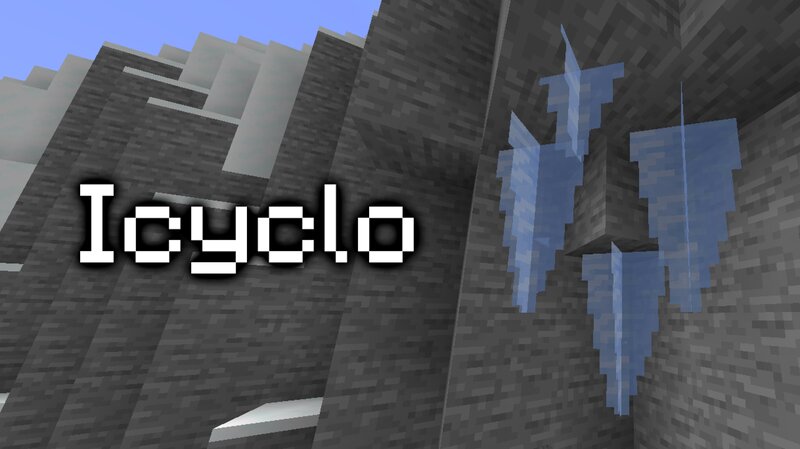
About the Datapack Icyclo is a Minecraft datapack that adds Icicles, which you can find generating in Caves, on Trees and in Structures in cold biomes across your world. Gather some with a Silk Touch Pickaxe and use them to get Powdered Snow, Ice* or just for decoration! You can find the full list of features this datapack introduces in the changelog tab. Icyclo is available in 19 languages: English (US, UK and even Upside Down!) Spanish (Spain and Mexico) Portuguese (Portugal and Brazil) Russian French German Italian Polish Ukrainian Chinese (Traditional and Simplified) Korean Hindi Arabic Swedish *Requires the "The Grinding Table" datapack. FAQ Q: How can I disable the "Loaded succesfully!" message? A: Add the No HFD Load Popups datapack to your datapack/mod folder. Q: The pack doesn't work! / I don't see the "datapack loaded succesfully!" message! A: You're on a Minecraft version that doesn't support the pack. Check the versions tab for compatible Minecraft versions. Q: The Icicles work, but have missing textures! A: You don't have the resourcepack installed. You can find it in the versions tab . Q: Does this datapack cause a lot of lag? A: Most of the time, none at all! Icyclo
Added value
What’s included on this page
Preview, categories, compatibility, and tools on this page — not a bare file mirror.
- Creator
- happyfied
- Source
- Minecraft downloads library on Eaglercraft Studio
- Type
- Minecraft data pack
- Price
- Free download on Eaglercraft Studio
- Curation
- Listed with credit to happyfied · studio preview & install guide
- Compatible with
- Minecraft Java (match version / loader in facts)
- Tags
- Block, Cold, Functions, Ice, Icicle, Recipes
Install guide
How to install this free data pack
Data pack listing with creator credit and world-folder install steps.
- 1Download the datapack archive.
- 2Open your world folder → datapacks, and place the zip or folder there.
- 3Run /reload in-game (or reopen the world) to enable it.
Data packs are Java Edition. Match the pack’s game version to avoid broken recipes or worldgen.
Related free data packs
More curated data packs from the same library section.

MoisturePack · 75 diamonds · 6 views

ProGameBot · 46 diamonds · 3 views

sniffercraft34 · 46 diamonds · 1 views

sniffercraft34 · 45 diamonds · 648 views