
Item Survival
Creator: AppleTomaTo · 2026-08-21 · Data packs · Free on Eaglercraft Studio
Download Item Survival — free Minecraft data pack. Created by AppleTomaTo. Tagged other. Drop into your world’s datapacks folder when the archive is available.
Creator notes
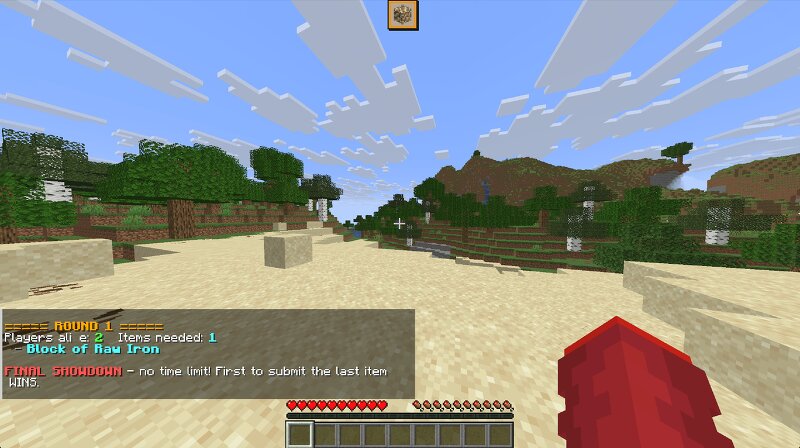
# Item Survival — Craft to Survive! **Item Survival** is a fast-paced, competitive multiplayer data pack that plays like **"Musical Chairs" combined with Minecraft item crafting!** In each round, the game reveals an item list with fewer items than there are surviving players. Players must race against time and each other to craft or collect one of the items. Fail to secure an item before time runs out, and you're eliminated! --- ## How It Works 1. **Prep Phase (Default 60s):** All active players spawn into the world and get time to gather basic tools and materials. 2. **Round Start:** An item list is generated. The list size is always **`Current Survivors − 1`** *(e.g., 4 survivors = 3 available items)*. 3. **First-Come, First-Served:** * As soon as a player obtains an item on the list in their inventory, it automatically claims it for them. * Once claimed, that item is removed from the list—meaning other players must hunt for the remaining items! * Pro Strategy:** Players who have already secured an item can continue claiming other items on the list to starve out opponents and force early round terminations! 4. **Elimination:** When the timer expires or all items are claimed, any
Added value
What’s included on this page
Preview, categories, compatibility, and tools on this page — not a bare file mirror.
- Creator
- AppleTomaTo
- Source
- Minecraft downloads library on Eaglercraft Studio
- Type
- Minecraft data pack
- Price
- Free download on Eaglercraft Studio
- Curation
- Listed with credit to AppleTomaTo · studio preview & install guide
- to version
- Minecraft 26.3 snapshot
- Compatible with
- Minecraft Java (match version / loader in facts)
- Tags
- Other
Install guide
How to install this free data pack
Data pack listing with creator credit and world-folder install steps.
- 1Download the datapack archive.
- 2Open your world folder → datapacks, and place the zip or folder there.
- 3Run /reload in-game (or reopen the world) to enable it.
Data packs are Java Edition. Match the pack’s game version to avoid broken recipes or worldgen.
Related free data packs
More curated data packs from the same library section.

MoisturePack · 75 diamonds · 6 views

ProGameBot · 46 diamonds · 3 views

sniffercraft34 · 46 diamonds · 1 views

sniffercraft34 · 45 diamonds · 648 views