
🔒 Level = Border Challenge (Vanilla Datapack 1.21.11)
Creator: Heykikoo · 2026-03-10 · Data packs · Free on Eaglercraft Studio
Download 🔒 Level = Border Challenge (Vanilla Datapack 1.21.11) — free Minecraft data pack. Created by Heykikoo. Tagged border, challenge, datapack, functions. Drop into your world’s datapacks folder when the archive is available.
Creator notes
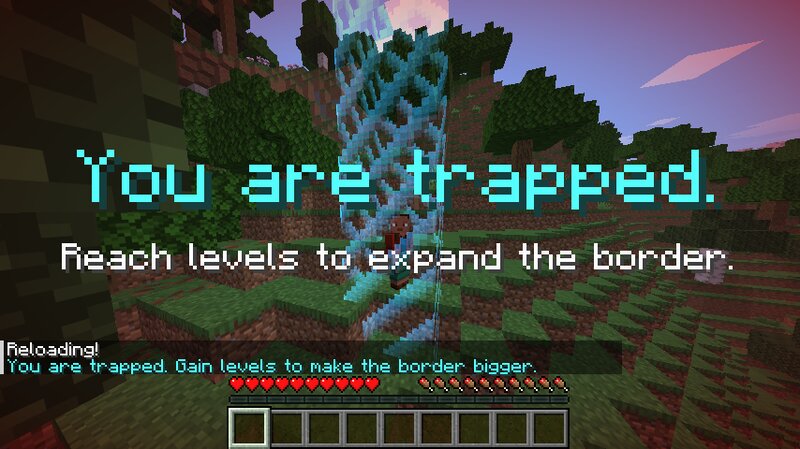
🚨 Update Notice First of all, sorry to everyone who downloaded the earlier version of the datapack 🙏 The problem was that hostile mobs don't spawn reliably inside a very small world border using normal Vanilla mechanics. Minecraft simply needs more valid spawn space. To fix this, I added a random spawn system so hostile mobs can appear just outside the border. This keeps the challenge playable while staying as close as possible to the Vanilla feeling. ✅ Changes in this update 🌙 Improved night mob spawning 👾 More natural hostile mob variety 📈 Better border progression 🛠 Fixed level-based border expansion 🌍 Improved border behavior across dimensions 🔧 General fixes and adjustments If you find bugs or have ideas for the datapack, feel free to leave a comment 💬 Greetings from HeyKikoo 🚀 🔒 Level = Border Challenge (Vanilla Datapack 1.21.11) This datapack turns Minecraft into a progression challenge. The world border starts extremely small, trapping the player in a tiny area. To make the border bigger, you need to gain experience levels. Every time a player reaches a new highest level , the border expands further. This creates a survival challenge where progression, exploration, and XP f
Added value
What’s included on this page
Preview, categories, compatibility, and tools on this page — not a bare file mirror.
- Creator
- Heykikoo
- Source
- Minecraft downloads library on Eaglercraft Studio
- Type
- Minecraft data pack
- Price
- Free download on Eaglercraft Studio
- Curation
- Listed with credit to Heykikoo · studio preview & install guide
- Compatible with
- Minecraft Java (match version / loader in facts)
- Tags
- Border, Challenge, Datapack, Functions, Game Mechanic, Hard
Install guide
How to install this free data pack
Data pack listing with creator credit and world-folder install steps.
- 1Download the datapack archive.
- 2Open your world folder → datapacks, and place the zip or folder there.
- 3Run /reload in-game (or reopen the world) to enable it.
Data packs are Java Edition. Match the pack’s game version to avoid broken recipes or worldgen.
Related free data packs
More curated data packs from the same library section.

MoisturePack · 75 diamonds · 6 views

ProGameBot · 46 diamonds · 3 views

sniffercraft34 · 46 diamonds · 1 views

sniffercraft34 · 45 diamonds · 648 views