
Living NPC
Creator: ThirtyFangs · 2026-01-22 · Data packs · Free on Eaglercraft Studio
Download Living NPC — free Minecraft data pack. Created by ThirtyFangs. Tagged functions, quality of life. Drop into your world’s datapacks folder when the archive is available.
Creator notes
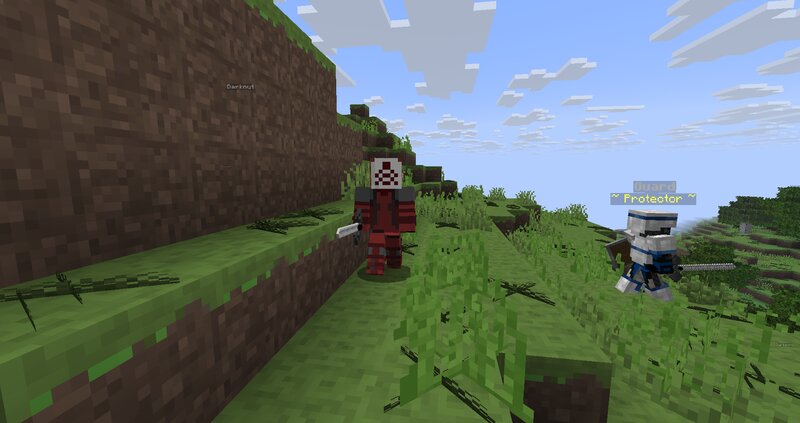
This datapack adds various NPC, useful for mapmaking, and allows the possibility to create custom armies for mutliplayer. NPC react to their environment The datapack doesn't change anything to the survival gameplay, but is useful for mapmaking and to be referenced in other datapacks. CUSTOM ARMIES Before playing If you use the army feature, teleporting is deprecated To set armies owners: Open the datapack, go to data/npc_army/function/ In team1.mcfunction, set the name of the owner of the first army, then, in-game, run /team join team1 <username of the owner of team1> In team2.mcfunction, set the name of the owner of the second army, then, in-game, run /team join team2 <username of the owner of team2> To set armies banners that soldiers will wear: Open the datapack, go to data/npc_army/function/ In banner_team_1.mcfunction, open the link and generate a banner, then copy the nbt accordingly In banner_team_2.mcfunction, open the link and generate a banner, then copy the nbt accordingly In-game once the armies are setup To summon guard from each armies, run for each knight of team 1 /function living_npc:player_guard/team1/guard1_[to 9]_ , and for each knight of team 2 /function livin
Added value
What’s included on this page
Preview, categories, compatibility, and tools on this page — not a bare file mirror.
- Creator
- ThirtyFangs
- Source
- Minecraft downloads library on Eaglercraft Studio
- Type
- Minecraft data pack
- Price
- Free download on Eaglercraft Studio
- Curation
- Listed with credit to ThirtyFangs · studio preview & install guide
- to version
- Minecraft 26.1
- Compatible with
- Minecraft Java (match version / loader in facts)
- Tags
- Functions, Quality Of Life
Install guide
How to install this free data pack
Data pack listing with creator credit and world-folder install steps.
- 1Download the datapack archive.
- 2Open your world folder → datapacks, and place the zip or folder there.
- 3Run /reload in-game (or reopen the world) to enable it.
Data packs are Java Edition. Match the pack’s game version to avoid broken recipes or worldgen.
Related free data packs
More curated data packs from the same library section.

MoisturePack · 75 diamonds · 6 views

ProGameBot · 46 diamonds · 3 views

sniffercraft34 · 46 diamonds · 1 views

sniffercraft34 · 45 diamonds · 648 views