
Map Preview Icons
Creator: Eroxen · 2026-09-10 · Data packs · Free on Eaglercraft Studio
Download Map Preview Icons — free Minecraft data pack. Created by Eroxen. Tagged advancements, functions, predicates, quality of life. Drop into your world’s datapacks folder when the archive is available.
Creator notes
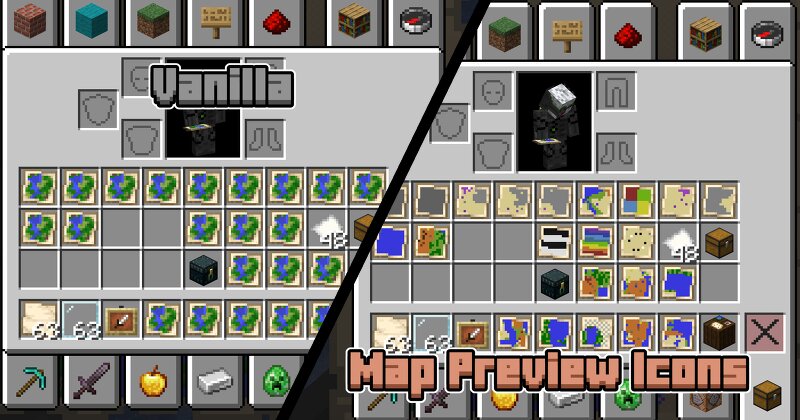
If you've ever used maps in Minecraft, you've probably ran into the issue where you have dozens of maps in your inventory, and now you need to hold them one by one to find the one you're looking for. With Map Preview Icons, that's a thing of the past! Map item icons now show a little preview of the map, so you can tell them apart at a glance. How it works + limitations This project uses both a datapack and a resourcepack. The resource pack makes the map item model a composite of a bunch of pixels that can individually be coloured through custom model data. When you're holding a map, the datapack scans the blocks around you to set the right colours on that custom model data. One technical limitation of Datapacks is that they cannot read map data. Map Preview Icons tries to circumvent this issue by tracking where each map was made with a custom system. The moment you create a new map your position is recorded and stored, and when you use a Cartography Table your inventory is monitored for changes. This way of doing things has some limitations! First of all, any maps you made before installing this pack will not show a preview , since the pack was not there to record you making the ma
Added value
What’s included on this page
Preview, categories, compatibility, and tools on this page — not a bare file mirror.
- Creator
- Eroxen
- Source
- Minecraft downloads library on Eaglercraft Studio
- Type
- Minecraft data pack
- Price
- Free download on Eaglercraft Studio
- Curation
- Listed with credit to Eroxen · studio preview & install guide
- Compatible with
- Minecraft Java (match version / loader in facts)
- Tags
- Advancements, Functions, Predicates, Quality Of Life, Recipes
Install guide
How to install this free data pack
Data pack listing with creator credit and world-folder install steps.
- 1Download the datapack archive.
- 2Open your world folder → datapacks, and place the zip or folder there.
- 3Run /reload in-game (or reopen the world) to enable it.
Data packs are Java Edition. Match the pack’s game version to avoid broken recipes or worldgen.
Related free data packs
More curated data packs from the same library section.

MoisturePack · 75 diamonds · 6 views

ProGameBot · 46 diamonds · 3 views

sniffercraft34 · 46 diamonds · 1 views

sniffercraft34 · 45 diamonds · 648 views