
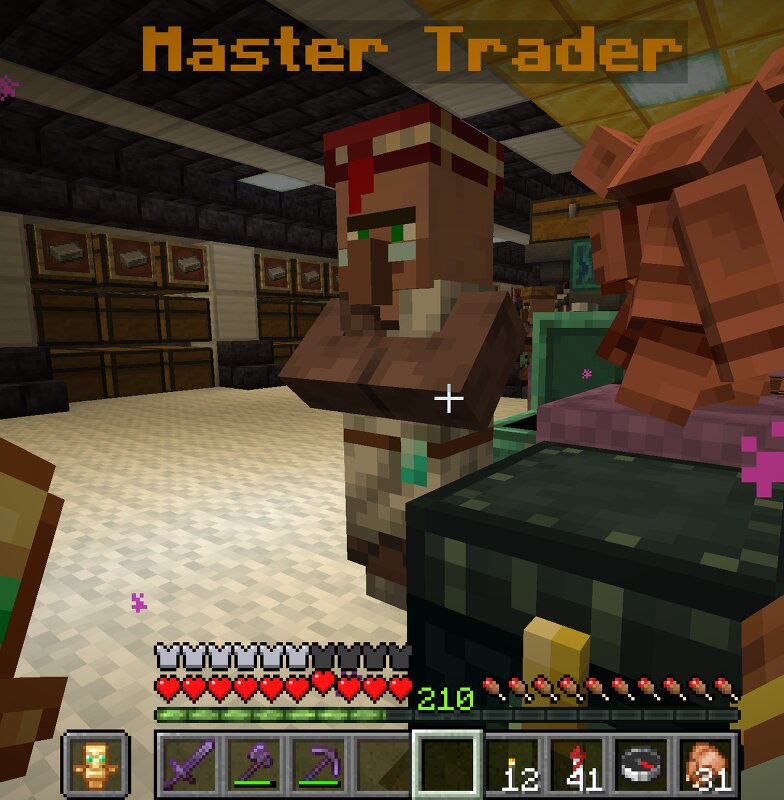
Master Trader
Creator: Xek · 2026-09-22 · Data packs · Free on Eaglercraft Studio
Download Master Trader — free Minecraft data pack. Created by Xek. Tagged advancements, functions, loot tables, other. Drop into your world’s datapacks folder when the archive is available.
Creator notes
👑 MASTER TRADER V4.1 Master Trader adds a special progression-based merchant to your Minecraft survival world! Trade with him to earn XP and unlock new items as he progresses through 5 ranks: Novice → Apprentice → Journeyman → Expert → Master ✨ FEATURES • 200+ survival trades • 5 progression levels • Buy useful resources with emeralds • Sell selected resources for emeralds • Unlimited trading — no waiting for restocks • Building materials, farming supplies & mob drops • Large Redstone inventory • Nether, End & Ocean resources • Rare and endgame items • Normal villagers are NOT affected • Survival friendly • Vanilla style • No mods required 💰 SELL YOUR EXTRA RESOURCES Have an iron farm or tons of extra materials? The Master Trader buys selected resources, including iron, coal and crops, allowing you to turn excess supplies into emeralds. ⚖️ BUILT FOR SURVIVAL The goal isn't to give you Creative Mode. Common resources are affordable, while rare and powerful items remain expensive. The Master Trader is designed to reduce tedious grinding while keeping survival progression meaningful. 🛠️ COMMANDS /function master_trader:summon /function master_trader:status /function master_trader:help
Added value
What’s included on this page
Preview, categories, compatibility, and tools on this page — not a bare file mirror.
- Creator
- Xek
- Source
- Minecraft downloads library on Eaglercraft Studio
- Type
- Minecraft data pack
- Price
- Free download on Eaglercraft Studio
- Curation
- Listed with credit to Xek · studio preview & install guide
- Compatible with
- Minecraft Java (match version / loader in facts)
- Tags
- Advancements, Functions, Loot Tables, Other, Predicates, Recipes
Install guide
How to install this free data pack
Data pack listing with creator credit and world-folder install steps.
- 1Download the datapack archive.
- 2Open your world folder → datapacks, and place the zip or folder there.
- 3Run /reload in-game (or reopen the world) to enable it.
Data packs are Java Edition. Match the pack’s game version to avoid broken recipes or worldgen.
Related free data packs
More curated data packs from the same library section.

MoisturePack · 75 diamonds · 6 views

ProGameBot · 46 diamonds · 3 views

sniffercraft34 · 46 diamonds · 1 views

sniffercraft34 · 45 diamonds · 648 views