
MBuild Converter — создавай постройки для Minecraft с помощью текста и AI (поддержка WorldEdit)
Creator: renjer14 · 2026-03-06 · Data packs · Free on Eaglercraft Studio
Download MBuild Converter — создавай постройки для Minecraft с помощью текста и — free Minecraft data pack. Created by renjer14. Tagged builder, converter, generator, schematics. Drop into your world’s datapacks folder when the archive is available.
Creator notes
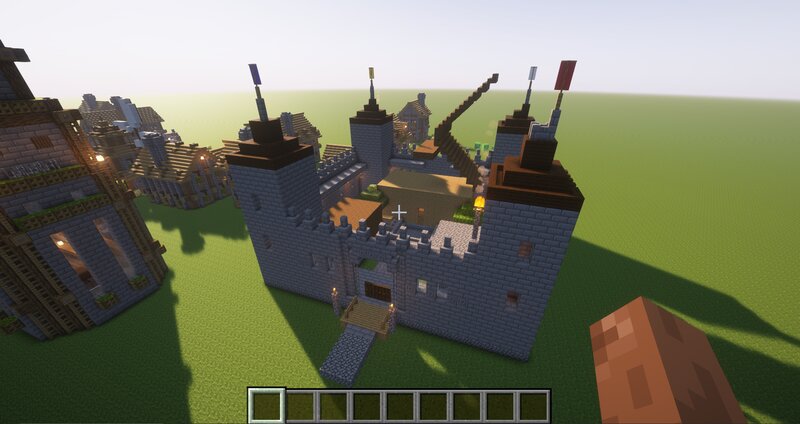
Это НЕ датапак, а ИНСТРУМЕНТ, который помогает создавать структуры для датапаков и карт. Ты просто описываешь постройку текстом (или просишь AI), конвертируешь, и получаешь готовый .schem файл для WorldEdit. Как это работает: Напиши команды в формате MBuild (простой текстовый язык) ИЛИ попроси AI (ChatGPT, Gemma и др.) сгенерировать описание постройки. Вставь текст в конвертер -> нажми "Конвертировать" Скачай готовый .schem файл Закинь в папку config/worldedit/schematics/ В игре: //schem load название //paste ✅ Готово! Постройка появляется в твоём мире. Что умеет MBuild Converter: BLOCK — поставить один блок FILL — заполнить область HOLLOW / WALLS / FLOOR — полые конструкции, стены, пол LINE — линия блоков CIRCLE / SPHERE / CYLINDER — круги, сферы, цилиндры (в том числе полые) REPEAT — циклы для повторяющихся элементов PALETTE / SET — короткие имена для блоков 📦 Поддержка всех блоков Minecraft 1.21+ с указанием свойств (например, minecraft:oak_stairs[facing=east]) Почему это удобно для создателей датапаков: Быстрая генерация структур (деревни, замки, подземелья) Возможность использовать AI для идей и черновиков Экономия часов ручной работы Готовые .schem файлы можно встраивать в да
Added value
What’s included on this page
Preview, categories, compatibility, and tools on this page — not a bare file mirror.
- Creator
- renjer14
- Source
- Minecraft downloads library on Eaglercraft Studio
- Type
- Minecraft data pack
- Price
- Free download on Eaglercraft Studio
- Curation
- Listed with credit to renjer14 · studio preview & install guide
- to version
- Minecraft 1.21
- Compatible with
- Minecraft Java (match version / loader in facts)
- Tags
- Builder, Converter, Generator, Schematics, Structures, Tool
Install guide
How to install this free data pack
Data pack listing with creator credit and world-folder install steps.
- 1Download the datapack archive.
- 2Open your world folder → datapacks, and place the zip or folder there.
- 3Run /reload in-game (or reopen the world) to enable it.
Data packs are Java Edition. Match the pack’s game version to avoid broken recipes or worldgen.
Related free data packs
More curated data packs from the same library section.

MoisturePack · 75 diamonds · 6 views

ProGameBot · 46 diamonds · 3 views

sniffercraft34 · 46 diamonds · 1 views

sniffercraft34 · 45 diamonds · 648 views