
MC-26 GX - Drive Spaceships (No resource pack)
Creator: ThirtyFangs · 2026-06-25 · Data packs · Free on Eaglercraft Studio
Download MC-26 GX - Drive Spaceships (No resource pack) — free Minecraft data pack. Created by ThirtyFangs. Tagged functions, game mechanic. Drop into your world’s datapacks folder when the archive is available.
Creator notes
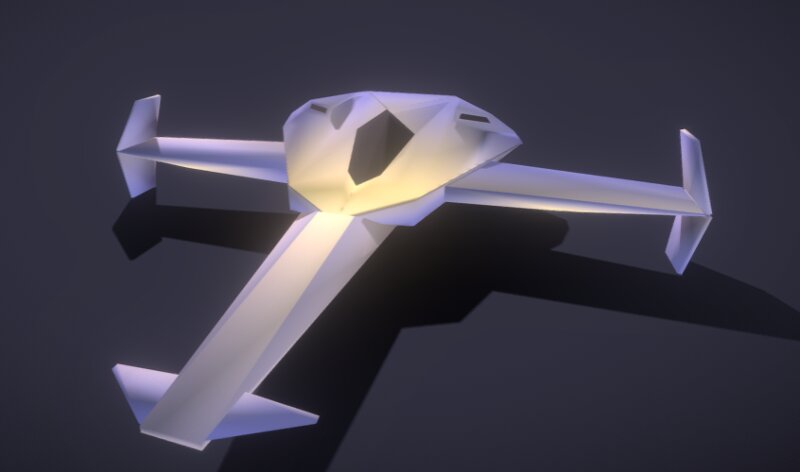
MC-26 GX: No resource pack required This datapack adds driveable race spaceships! One of the spaceship rendered in sketchfab, exactly the same as in-game Those spaceships can fly but can't go up or down by default, you will need to place specific blocks designed for this under the spaceship to make the spaceship go up or down (like yellow concrete & another concrete color, see the last section of this page). Only the exploration spaceship that can be used to fly everywhere. How to place a spaceship To place a spaceship, run /function gx:spaceships/<choose an option>. How to use the race editor With 3D elements Run anything from /function gx:racetrack/ to spawn elements from the race editor! You are able to spawn futuristic pillar, sphere, rotating elements and the base racetrack! The hitbox isnt included so you'll have to place barrier to set hitbox With vanilla blocks GO UP OR DOWN Some blocks create specific actions! Yellow concrete makes your spaceship go up from 1.5 block over the world surface Lime concrete allows you to go up in the -Z direction, (place it after a yellow concrete block, also useful as a booster) Blue concrete allows you to go up in the Z direction, (place it
Added value
What’s included on this page
Preview, categories, compatibility, and tools on this page — not a bare file mirror.
- Creator
- ThirtyFangs
- Source
- Minecraft downloads library on Eaglercraft Studio
- Type
- Minecraft data pack
- Price
- Free download on Eaglercraft Studio
- Curation
- Listed with credit to ThirtyFangs · studio preview & install guide
- to version
- Minecraft 26.2
- Compatible with
- Minecraft Java (match version / loader in facts)
- Tags
- Functions, Game Mechanic
Install guide
How to install this free data pack
Data pack listing with creator credit and world-folder install steps.
- 1Download the datapack archive.
- 2Open your world folder → datapacks, and place the zip or folder there.
- 3Run /reload in-game (or reopen the world) to enable it.
Data packs are Java Edition. Match the pack’s game version to avoid broken recipes or worldgen.
Related free data packs
More curated data packs from the same library section.

MoisturePack · 75 diamonds · 6 views

ProGameBot · 46 diamonds · 3 views

sniffercraft34 · 46 diamonds · 1 views

sniffercraft34 · 45 diamonds · 648 views