
Minecraft But Hotbar Only
Creator: BebuPlayz · 2026-05-20 · Data packs · Free on Eaglercraft Studio
Download Minecraft But Hotbar Only — free Minecraft data pack. Created by BebuPlayz. Tagged advancements, but, functions, minecraft. Drop into your world’s datapacks folder when the archive is available.
Creator notes
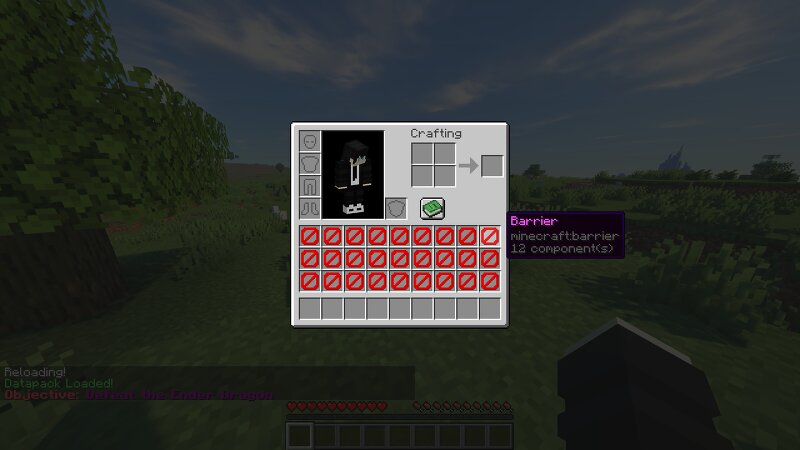
Minecraft, But Hotbar Only... Minecraft But Hotbar Only completely removes access to your main inventory and leaves you with only the 9 slots in your hotbar. That means no extra storage, no backup tools, and no carrying stacks of resources. Every item you bring matters. This simple change creates a surprisingly challenging and strategic survival experience: 🧠 Carefully choose which tools, blocks, and food to carry ⛏️ Manage resources efficiently with extremely limited inventory space 🎒 Use chests, shulker boxes, and ender chests more creatively ⚔️ Prepare smarter for mining, exploring, and boss fights 🔥 Experience Minecraft in a whole new way Whether you're a veteran player looking for a fresh challenge or a content creator searching for a unique "Minecraft But..." concept, this mod delivers a fun and intense twist on vanilla survival. Features: Only the hotbar's 9 slots are usable All other player inventory slots are disabled, even the offhand slot Works in both single-player and multiplayer Lightweight and compatible with most setups
Added value
What’s included on this page
Preview, categories, compatibility, and tools on this page — not a bare file mirror.
- Creator
- BebuPlayz
- Source
- Minecraft downloads library on Eaglercraft Studio
- Type
- Minecraft data pack
- Price
- Free download on Eaglercraft Studio
- Curation
- Listed with credit to BebuPlayz · studio preview & install guide
- Compatible with
- Minecraft Java (match version / loader in facts)
- Tags
- Advancements, But, Functions, Minecraft, Minecraftbut, Minecraftbuthotbaronly
Install guide
How to install this free data pack
Data pack listing with creator credit and world-folder install steps.
- 1Download the datapack archive.
- 2Open your world folder → datapacks, and place the zip or folder there.
- 3Run /reload in-game (or reopen the world) to enable it.
Data packs are Java Edition. Match the pack’s game version to avoid broken recipes or worldgen.
Related free data packs
More curated data packs from the same library section.

MoisturePack · 75 diamonds · 6 views

ProGameBot · 46 diamonds · 3 views

sniffercraft34 · 46 diamonds · 1 views

sniffercraft34 · 45 diamonds · 648 views