
Minecraft But Jumping Enchants
Creator: BebuPlayz · 2026-05-08 · Data packs · Free on Eaglercraft Studio
Download Minecraft But Jumping Enchants — free Minecraft data pack. Created by BebuPlayz. Tagged advancements, but, functions, minecraft. Drop into your world’s datapacks folder when the archive is available.
Creator notes
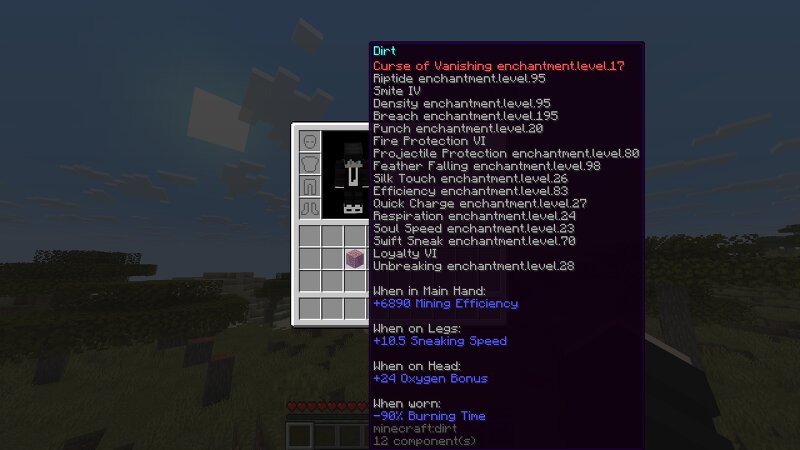
Minecraft But Jumping Enchants Items Minecraft But Jumping Enchants Items is a chaotic vanilla datapack where every jump can randomly enchant a random item in your inventory. Start with almost nothing, keep moving, and watch your gear get stronger, weirder, and sometimes completely ridiculous as you play. With 41 enchantments spread across 3 power tiers, the datapack turns a simple survival run into a fast-paced challenge where every jump matters. It also includes multiplayer support and a themed advancement tab to guide your progress from your first wooden pickaxe to the final fight. Features Every jump randomly enchants a random item in your inventory. 41 enchantments are available across 3 tiers: Normal, OK, and OP. Multiplayer support, with all players affected at the same time. Custom Objective advancement tab. 📦 Installation This is a Datapack - no mods required. Download the .zip file Open Minecraft and navigate to your world's folder %appdata%.minecraft\saves<YourWorldName>\ on Windows ~/Library/Application Support/minecraft/saves/<YourWorldName>/ on macOS Drop the .zip directly into the datapacks folder (do not unzip it) Launch your world and run /reload if the world is al
Added value
What’s included on this page
Preview, categories, compatibility, and tools on this page — not a bare file mirror.
- Creator
- BebuPlayz
- Source
- Minecraft downloads library on Eaglercraft Studio
- Type
- Minecraft data pack
- Price
- Free download on Eaglercraft Studio
- Curation
- Listed with credit to BebuPlayz · studio preview & install guide
- Compatible with
- Minecraft Java (match version / loader in facts)
- Tags
- Advancements, But, Functions, Minecraft, Minecraftbut, Minecraftbutjumpingenchants
Install guide
How to install this free data pack
Data pack listing with creator credit and world-folder install steps.
- 1Download the datapack archive.
- 2Open your world folder → datapacks, and place the zip or folder there.
- 3Run /reload in-game (or reopen the world) to enable it.
Data packs are Java Edition. Match the pack’s game version to avoid broken recipes or worldgen.
Related free data packs
More curated data packs from the same library section.

MoisturePack · 75 diamonds · 6 views

ProGameBot · 46 diamonds · 3 views

sniffercraft34 · 46 diamonds · 1 views

sniffercraft34 · 45 diamonds · 648 views