
Minecraft Hunter Game
Creator: SnSilent · 2026-09-13 · Data packs · Free on Eaglercraft Studio
Download Minecraft Hunter Game — free Minecraft data pack. Created by SnSilent. Tagged challenge, dream, dreamchallenges, functions. Drop into your world’s datapacks folder when the archive is available.
Creator notes
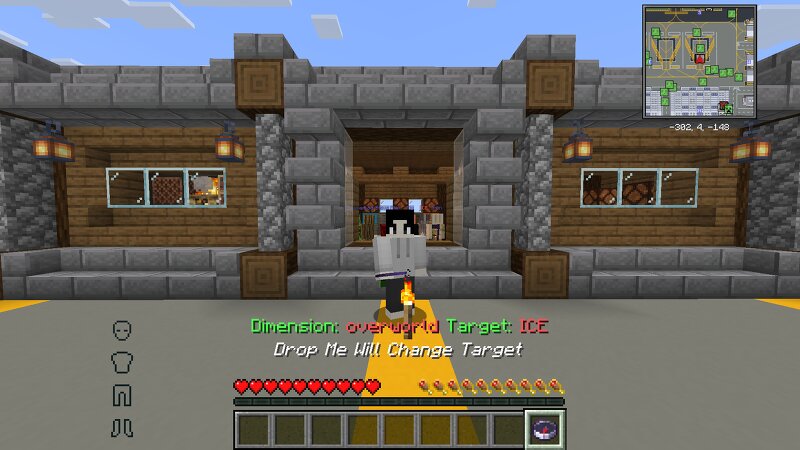
Introduction: The Hunter game is divided into two teams, Hunter and Runner Hunter: There is a compass on the body pointing to the Runner, killing the Runner will win Runner: When there are multiple Runner, death becomes a spectator. With only one life, the death of the Last ender_dragon will win Load: Do not install Forge on both the client and server, and do not decompress the datapack, otherwise it cannot be loaded There is a LanguagePack.zip in the HunterGame.zip, put it in your Resourcepacks folder and load it, please also send it to other players Put the datapack into the datapacks folder of your save, then enter the world, path: .minecraft\saves\YourSave\datapacks\ Warning: Please create a new save to use when playing, and do not play the same save for the second time The compass is /item in the Slot.8 of the Inventory, and no other items can be placed in this Slot Options: Placing the mouse over an option will prompt you with what it does: -Initialization = After all players come in, click to reset all options -Hunter Debuff = At the beginning, the hunter is blind and slow, Disabled by default -Kill Glowing = The Runner will light up every time it kills the hunter, Disabled
Added value
What’s included on this page
Preview, categories, compatibility, and tools on this page — not a bare file mirror.
- Creator
- SnSilent
- Source
- Minecraft downloads library on Eaglercraft Studio
- Type
- Minecraft data pack
- Price
- Free download on Eaglercraft Studio
- Curation
- Listed with credit to SnSilent · studio preview & install guide
- Compatible with
- Minecraft Java (match version / loader in facts)
- Tags
- Challenge, Dream, Dreamchallenges, Functions, Manhunt, Other
Install guide
How to install this free data pack
Data pack listing with creator credit and world-folder install steps.
- 1Download the datapack archive.
- 2Open your world folder → datapacks, and place the zip or folder there.
- 3Run /reload in-game (or reopen the world) to enable it.
Data packs are Java Edition. Match the pack’s game version to avoid broken recipes or worldgen.
Related free data packs
More curated data packs from the same library section.

MoisturePack · 75 diamonds · 6 views

ProGameBot · 46 diamonds · 3 views

sniffercraft34 · 46 diamonds · 1 views

sniffercraft34 · 45 diamonds · 648 views