
Mobcraft TCG
Creator: aegeus_mc · 2025-12-13 · Data packs · Free on Eaglercraft Studio
Download Mobcraft TCG — free Minecraft data pack. Created by aegeus_mc. Tagged cards, collectible, drops, item. Drop into your world’s datapacks folder when the archive is available.
Creator notes
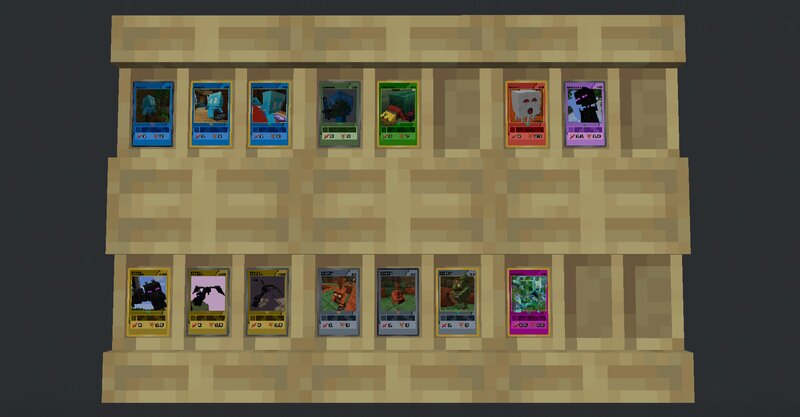
RESOURCE PACK The Mobcraft TCG Resource Pack is needed for the card textures to show. ABOUT To all players who like collecting trading cards, you can now enjoy your hobby while playing Minecraft. All mobs, when killed by a player, have a chance to drop not only one, but ten different cards that vary in frames, arts, and rarities. There are 13 card types, 5 rarities, and 5 editions: 13 Card Types The types correspond to the nature or behavior of the mobs. Card types are differentiated by the main color of the cards. Rarities Determine the chance of a card dropping. Each of the five rarities have different card arts. Editions The editions also contribute to the rarity of the cards. These are distinguished by their frames. Apex and Phantom editions on the other hand are full arts so they have no frames. COMPATIBILITY Works in versions 1.21.10 Texture size: 256x DISCLAIMER The texture pack is currently in alpha phase. The available cards at the moment are common up to epic cards (first, silver, and gold editions) - When full art and ghost cards are dropped, they will have no texture yet (will appear as black and purple cubes). The drop chances are subject to change. Your feedback is gr
Added value
What’s included on this page
Preview, categories, compatibility, and tools on this page — not a bare file mirror.
- Creator
- aegeus_mc
- Source
- Minecraft downloads library on Eaglercraft Studio
- Type
- Minecraft data pack
- Price
- Free download on Eaglercraft Studio
- Curation
- Listed with credit to aegeus_mc · studio preview & install guide
- Compatible with
- Minecraft Java (match version / loader in facts)
- Tags
- Cards, Collectible, Drops, Item, Items, Loot Tables
Install guide
How to install this free data pack
Data pack listing with creator credit and world-folder install steps.
- 1Download the datapack archive.
- 2Open your world folder → datapacks, and place the zip or folder there.
- 3Run /reload in-game (or reopen the world) to enable it.
Data packs are Java Edition. Match the pack’s game version to avoid broken recipes or worldgen.
Related free data packs
More curated data packs from the same library section.

MoisturePack · 75 diamonds · 6 views

ProGameBot · 46 diamonds · 3 views

sniffercraft34 · 46 diamonds · 1 views

sniffercraft34 · 45 diamonds · 648 views