
More totems
Creator: cota5 · 2026-08-28 · Data packs · Free on Eaglercraft Studio
Download More totems — free Minecraft data pack. Created by cota5. Tagged buff, datapack, datapacks, function. Drop into your world’s datapacks folder when the archive is available.
Creator notes
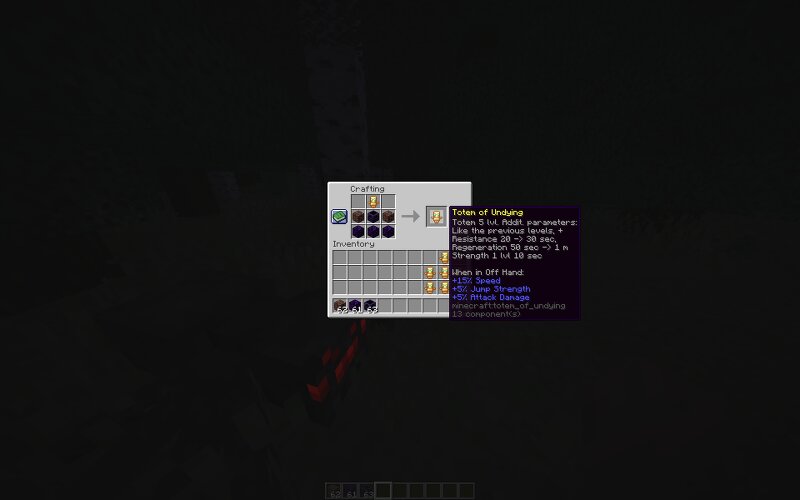
This datapack adds 10 tiers of Totems of Undying to Minecraft-ranging from the standard version to unique custom ones-featuring progressively stronger effects. These new totems can be obtained in various ways: by dropping from Evokers, through crafting, or by finding them in world structures. Each successive tier enhances the life-saving effects and provides additional bonuses; furthermore, when held in the off-hand, the totems grant permanent passive stat boosts to the player. Level 1 Standard Totem of Immortality. Level 2 In addition to the standard effects: Saturation: 2 units Regeneration: 50 sec. (instead of 45 sec.) Absorption: 10 sec. (instead of 5 sec.) Level 3 In addition to the effects of the previous level: Saturation: 5 units (instead of 2 units) Fire Resistance: 1 min. (instead of 40 sec.) Level 4 In addition to the effects of the previous level: Resistance I for 20 sec. When held in the left hand: Movement speed +10% Jump height +5% Level 5 In addition to the effects of the previous level: Resistance: 30 sec. (instead of 20 sec.) Regeneration: 1 min. (instead of 50 sec.) Strength I for 10 sec. When held in the left hand: Movement Speed +15% Jump Height +5% Damage +5
Added value
What’s included on this page
Preview, categories, compatibility, and tools on this page — not a bare file mirror.
- Creator
- cota5
- Source
- Minecraft downloads library on Eaglercraft Studio
- Type
- Minecraft data pack
- Price
- Free download on Eaglercraft Studio
- Curation
- Listed with credit to cota5 · studio preview & install guide
- to version
- Minecraft 26.2
- Compatible with
- Minecraft Java (match version / loader in facts)
- Tags
- Buff, Datapack, Datapacks, Function, Functions, Level
Install guide
How to install this free data pack
Data pack listing with creator credit and world-folder install steps.
- 1Download the datapack archive.
- 2Open your world folder → datapacks, and place the zip or folder there.
- 3Run /reload in-game (or reopen the world) to enable it.
Data packs are Java Edition. Match the pack’s game version to avoid broken recipes or worldgen.
Related free data packs
More curated data packs from the same library section.

MoisturePack · 75 diamonds · 6 views

ProGameBot · 46 diamonds · 3 views

sniffercraft34 · 46 diamonds · 1 views

sniffercraft34 · 45 diamonds · 648 views