
MPost - Advertise Your Shops In Vanilla!
Creator: TotallyRandom_ · 2026-07-30 · Data packs · Free on Eaglercraft Studio
Download MPost - Advertise Your Shops In Vanilla! — free Minecraft data pack. Created by TotallyRandom_. Tagged quality of life. Drop into your world’s datapacks folder when the archive is available.
Creator notes
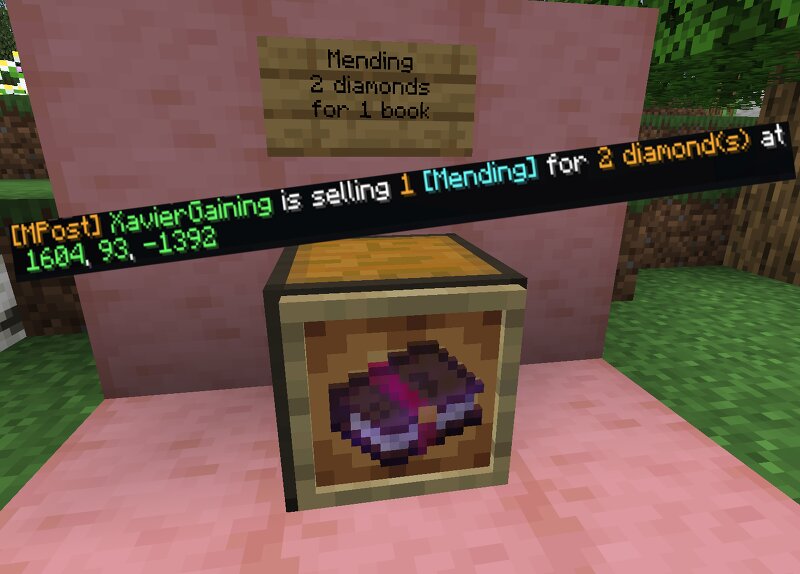
Do you run a minecraft server? Do your players have shops? Well then this datapack is just for you! Tested and working on latest version(26.2) It is a very simple datapack which simply adds the ability to advertise and announce a player's shop! It's especially useful for SMPs and such. The process is super simple and is detailed in a book you get by using: /trigger mpost_book The book will show you the 3 steps to setting up your ad - which you only need to do once! (Unless you want to change the price/amount/item you are selling) Step 1: You set the price with /trigger mpost_price set (price) Step 2: You set the amount you sell with /trigger mpost_amount set (price) Step 3: You then go to where your shop is(this will serve as the publishied location in the AD) Take one of the items you are selling and rename it(this is what will be displayed in the AD) Then you simply press on the [Press Here] button in the manual while holding the item and.. done! You will also get a preview in the chat to show you how the final AD will look like. (If it seems a bit complicated now, just look at the images showing the book - it's really simple) Now every 30 minutes(customizable by admins) you w
Added value
What’s included on this page
Preview, categories, compatibility, and tools on this page — not a bare file mirror.
- Creator
- TotallyRandom_
- Source
- Minecraft downloads library on Eaglercraft Studio
- Type
- Minecraft data pack
- Price
- Free download on Eaglercraft Studio
- Curation
- Listed with credit to TotallyRandom_ · studio preview & install guide
- to version
- Minecraft 26.2
- Compatible with
- Minecraft Java (match version / loader in facts)
- Tags
- Quality Of Life
Install guide
How to install this free data pack
Data pack listing with creator credit and world-folder install steps.
- 1Download the datapack archive.
- 2Open your world folder → datapacks, and place the zip or folder there.
- 3Run /reload in-game (or reopen the world) to enable it.
Data packs are Java Edition. Match the pack’s game version to avoid broken recipes or worldgen.
Related free data packs
More curated data packs from the same library section.

MoisturePack · 75 diamonds · 6 views

ProGameBot · 46 diamonds · 3 views

sniffercraft34 · 46 diamonds · 1 views

sniffercraft34 · 45 diamonds · 648 views