
Multiplayer Display HUD
Creator: Holazas · 2026-06-02 · Data packs · Free on Eaglercraft Studio
Download Multiplayer Display HUD — free Minecraft data pack. Created by Holazas. Tagged display, displayhud, displayshud, experience. Drop into your world’s datapacks folder when the archive is available.
Creator notes
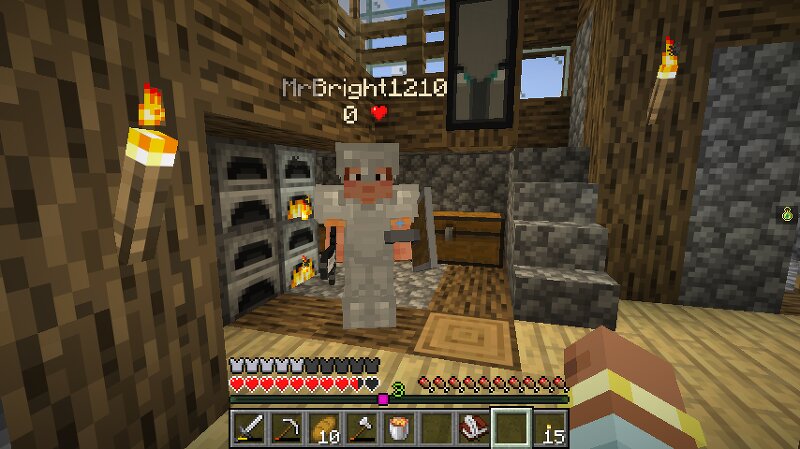
Minecraft unOfficial Display HUD Datapack This datapack shows the players HUD into various scoreboard methods of display. When installed, every player's health will be shown below his players name and next to his name in the server list (using TAB). Also, the experience level of all the players will be in the sidebar scoreboard, this last setting can be changed through commands To learn the basic commands of this datapack, the operator should use the following command: /function display_hud:help This data pack belongs to the Minecraft unOfficial Project . License This project is licensed under the GNU Lesser General Public License v2.1. You may use, modify, and redistribute it under the terms of the LGPL v2.1. This software is provided "as is", without warranty of any kind. See the LICENSE file or https://www.gnu.org/licenses/old-licenses/lgpl-2.1.txt for full license text.
Added value
What’s included on this page
Preview, categories, compatibility, and tools on this page — not a bare file mirror.
- Creator
- Holazas
- Source
- Minecraft downloads library on Eaglercraft Studio
- Type
- Minecraft data pack
- Price
- Free download on Eaglercraft Studio
- Curation
- Listed with credit to Holazas · studio preview & install guide
- to version
- Minecraft 26.1
- Compatible with
- Minecraft Java (match version / loader in facts)
- Tags
- Display, Displayhud, Displayshud, Experience, Functions, Health
Install guide
How to install this free data pack
Data pack listing with creator credit and world-folder install steps.
- 1Download the datapack archive.
- 2Open your world folder → datapacks, and place the zip or folder there.
- 3Run /reload in-game (or reopen the world) to enable it.
Data packs are Java Edition. Match the pack’s game version to avoid broken recipes or worldgen.
Related free data packs
More curated data packs from the same library section.

MoisturePack · 75 diamonds · 6 views

ProGameBot · 46 diamonds · 3 views

sniffercraft34 · 46 diamonds · 1 views

sniffercraft34 · 45 diamonds · 648 views