
No Rename italic
Creator: BibekTheLegend · 2026-04-24 · Data packs · Free on Eaglercraft Studio
Download No Rename italic — free Minecraft data pack. Created by BibekTheLegend. Tagged anvil, bibekthelegend, blocked, clean. Drop into your world’s datapacks folder when the archive is available.
Creator notes
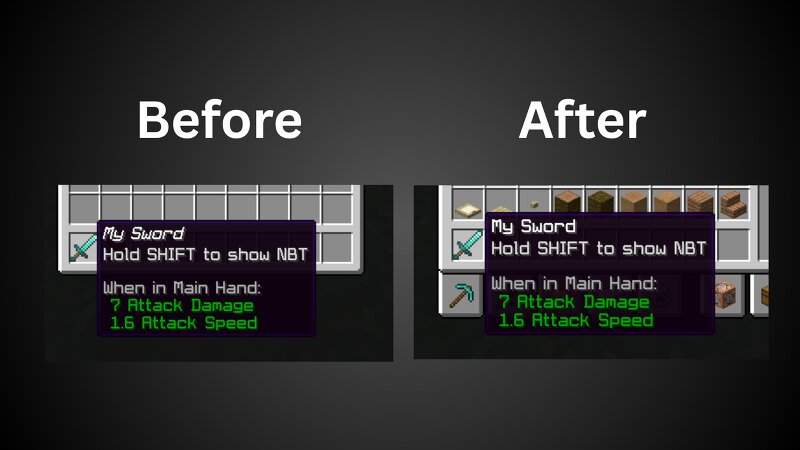
About This datapack removes the default italic formatting applied to renamed item names in Minecraft. Instead of the usual italic text, item names will appear in a clean, normal font for better readability and a more polished UI experience. /trigger no_italic.fix to fix the item name formatting. In multiplayer, only one player can use the system at a time. In single-player, it can be used without any restrictions. It only applies to items placed in hotbar slots. Additionally, this does not work with colored or custom-styled item names. Video
Added value
What’s included on this page
Preview, categories, compatibility, and tools on this page — not a bare file mirror.
- Creator
- BibekTheLegend
- Source
- Minecraft downloads library on Eaglercraft Studio
- Type
- Minecraft data pack
- Price
- Free download on Eaglercraft Studio
- Curation
- Listed with credit to BibekTheLegend · studio preview & install guide
- to version
- Minecraft 26.1
- Compatible with
- Minecraft Java (match version / loader in facts)
- Tags
- Anvil, Bibekthelegend, Blocked, Clean, Datapack, Farbic
Install guide
How to install this free data pack
Data pack listing with creator credit and world-folder install steps.
- 1Download the datapack archive.
- 2Open your world folder → datapacks, and place the zip or folder there.
- 3Run /reload in-game (or reopen the world) to enable it.
Data packs are Java Edition. Match the pack’s game version to avoid broken recipes or worldgen.
Related free data packs
More curated data packs from the same library section.

MoisturePack · 75 diamonds · 6 views

ProGameBot · 46 diamonds · 3 views

sniffercraft34 · 46 diamonds · 1 views

sniffercraft34 · 45 diamonds · 648 views