
OP Totems Datapack
Creator: Modular_boyAnsh · 2025-11-16 · Data packs · Free on Eaglercraft Studio
Download OP Totems Datapack — free Minecraft data pack. Created by Modular_boyAnsh. Tagged custom, datapack, difficulty, enchanteditems. Drop into your world’s datapacks folder when the archive is available.
Creator notes
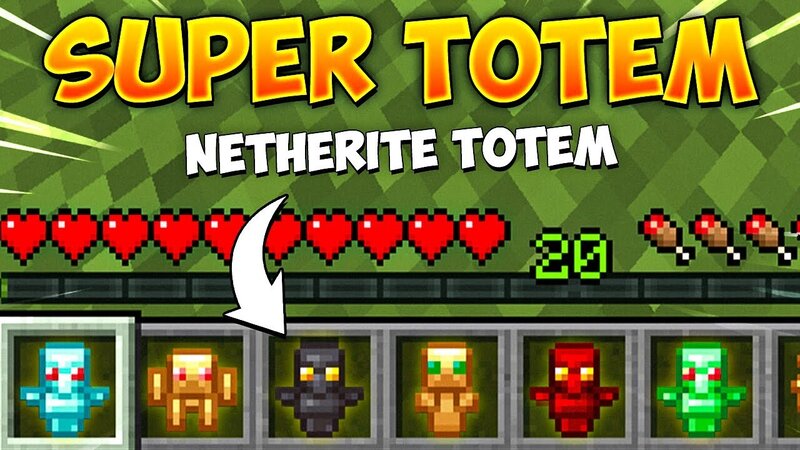
This datapack adds 8 completely new Custom Totems into Minecraft 1.19 - 1.19.3, each with their own special powers. Pop one into your off-hand and unlock effects like Speed, Strength, Regen, Haste, Luck, Extra Hearts, and even TNT blasting with a Detonator! Perfect for: Survival worlds Challenge videos SMP buff items OP fun maps PvE / PvP modifiers 🟩 Included Totems: Totem of Speed – Speed II Totem of Regeneration – Regen pulses Totem of Haste – Haste X Totem of Strength – Strength II Totem of Health – +20 hearts + Regen Totem of Luck – Luck effect Totem of TNT – Works with Detonator (right-click to blast, safe for player) SUPER Totem – Multiple buffs stacked (Speed, Haste, Regen, Strength, Jump, Luck, Health) 💥 Detonator Right-click with the Detonator while holding the TNT Totem in off-hand → drops a TNT blast without hurting you. 🎮 How to Get the Totems Run: /function ctotems:give/all This gives you all Totems + the Detonator instantly. (You can also give them individually using /function ctotems:give/<name>) 💾 Installation Drop the .zip file into: .minecraft/saves/<world>/datapacks/ Launch world → run: /reload 🟣 No Mods Required This is a pure datapack. Works on servers, singlep
Added value
What’s included on this page
Preview, categories, compatibility, and tools on this page — not a bare file mirror.
- Creator
- Modular_boyAnsh
- Source
- Minecraft downloads library on Eaglercraft Studio
- Type
- Minecraft data pack
- Price
- Free download on Eaglercraft Studio
- Curation
- Listed with credit to Modular_boyAnsh · studio preview & install guide
- Compatible with
- Minecraft Java (match version / loader in facts)
- Tags
- Custom, Datapack, Difficulty, Enchanteditems, Functions, Minecraft
Install guide
How to install this free data pack
Data pack listing with creator credit and world-folder install steps.
- 1Download the datapack archive.
- 2Open your world folder → datapacks, and place the zip or folder there.
- 3Run /reload in-game (or reopen the world) to enable it.
Data packs are Java Edition. Match the pack’s game version to avoid broken recipes or worldgen.
Related free data packs
More curated data packs from the same library section.

MoisturePack · 75 diamonds · 6 views

ProGameBot · 46 diamonds · 3 views

sniffercraft34 · 46 diamonds · 1 views

sniffercraft34 · 45 diamonds · 648 views