
Origins: Slime & Seek
Creator: FutureFrost · 2025-12-21 · Data packs · Free on Eaglercraft Studio
Download Origins: Slime & Seek — free Minecraft data pack. Created by FutureFrost. Tagged other. Drop into your world’s datapacks folder when the archive is available.
Creator notes
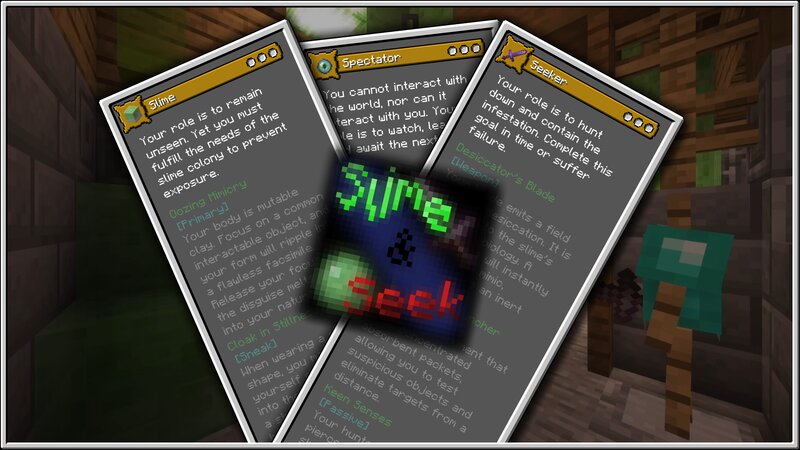
This data pack is designed for the Origins mod. For the best experience, it is highly recommended to also use Pehkui and Mob Origins, though the data pack should still somewhat function without them. This minigame Data Pack was built using a bunch of code from my Pantoslime Origin. If you would like to play an Origin similar to the mechanics shown here, go check out my Pantoslime Origin. This Data Pack differs significantly from the standard Origins Data Pack. I highly recommend you watch the video embedded above to learn how to set it up correctly. Keep in mind, this minigame is strictly multiplayer and requires some form of server to play. Setting this up with a server host is likely more work than most players will want to do, so I recommend using a mod like e4mc , World Host , or Essential . 🕹️ Player Roles 🕹️ Slime Your role is to remain unseen. Yet you must fulfill the needs of the slime colony to prevent exposure. 🟩 Oozing Mimicry [Primary]: Your body is mutable clay. Focus on a common interactable object, and your form will ripple into a flawless facsimile. Release your focus, and the disguise melts away into your natural state. 🟩 Cloak in Stillness [Sneak]: When wearing a
Added value
What’s included on this page
Preview, categories, compatibility, and tools on this page — not a bare file mirror.
- Creator
- FutureFrost
- Source
- Minecraft downloads library on Eaglercraft Studio
- Type
- Minecraft data pack
- Price
- Free download on Eaglercraft Studio
- Curation
- Listed with credit to FutureFrost · studio preview & install guide
- Compatible with
- Minecraft Java (match version / loader in facts)
- Tags
- Other
Install guide
How to install this free data pack
Data pack listing with creator credit and world-folder install steps.
- 1Download the datapack archive.
- 2Open your world folder → datapacks, and place the zip or folder there.
- 3Run /reload in-game (or reopen the world) to enable it.
Data packs are Java Edition. Match the pack’s game version to avoid broken recipes or worldgen.
Related free data packs
More curated data packs from the same library section.

MoisturePack · 75 diamonds · 6 views

ProGameBot · 46 diamonds · 3 views

sniffercraft34 · 46 diamonds · 1 views

sniffercraft34 · 45 diamonds · 648 views