
Rebuilt Dimensions
Creator: Goliushi · 2026-01-10 · Data packs · Free on Eaglercraft Studio
Download Rebuilt Dimensions — free Minecraft data pack. Created by Goliushi. Tagged adventure, alloy, alloys, bedrock. Drop into your world’s datapacks folder when the archive is available.
Creator notes
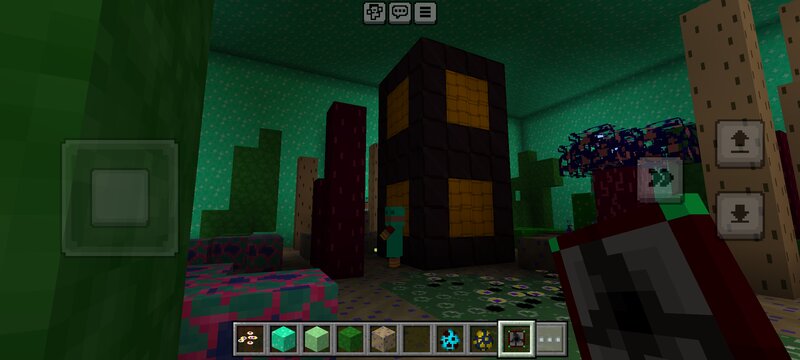
A.K.A "Revived Realms" Recover the lost dimensions. Additions include but are not limited to: New ores! New mobs! New golems! New dimensions like the Sumidworld and the Altend! How to use: 1. Make new world 2. Activate the data pack Please note: This mod will likely never be finished, as I'm continuously adding new stuff. These new dimensions aren't your normal dimensions - you build them. It's not just dimensions added: also new hazards, armor, torches, utility blocks, and minibosses. This is for Bedrock Edition, not Java Edition, so don't try to use this on Java. The reason why I put it in data packs even if it's for Bedrock is because I mistook it for a resource pack. The download button's outdated and has been for months. Use the zips for the updated mod! These dimensions do have lore, I just didn't put the lore in the mod. The Grand Return Update (after a forced hiatus due to a broken mod maker, Rebuilt Dimensions is finally back!): 3 new closely related dimensions: Lervedome, Stormyos, and Oezis! New mobs, blocks, and weapons! New torches and lantern types: Copper Iremanium, Soul Copper, and Soul Iremanium! New tool type: Scoopercups! Place stationary versions of fluid blocks
Added value
What’s included on this page
Preview, categories, compatibility, and tools on this page — not a bare file mirror.
- Creator
- Goliushi
- Source
- Minecraft downloads library on Eaglercraft Studio
- Type
- Minecraft data pack
- Price
- Free download on Eaglercraft Studio
- Curation
- Listed with credit to Goliushi · studio preview & install guide
- to version
- Minecraft 1.21
- Compatible with
- Minecraft Java (match version / loader in facts)
- Tags
- Adventure, Alloy, Alloys, Bedrock, Bedrockedition, Brewing
Install guide
How to install this free data pack
Data pack listing with creator credit and world-folder install steps.
- 1Download the datapack archive.
- 2Open your world folder → datapacks, and place the zip or folder there.
- 3Run /reload in-game (or reopen the world) to enable it.
Data packs are Java Edition. Match the pack’s game version to avoid broken recipes or worldgen.
Related free data packs
More curated data packs from the same library section.

MoisturePack · 75 diamonds · 6 views

ProGameBot · 46 diamonds · 3 views

sniffercraft34 · 46 diamonds · 1 views

sniffercraft34 · 45 diamonds · 648 views