
Refined fortress
Creator: kokoloko_133 · 2026-07-17 · Data packs · Free on Eaglercraft Studio
Download Refined fortress — free Minecraft data pack. Created by kokoloko_133. Tagged blaze, fortress, loot tables, nether. Drop into your world’s datapacks folder when the archive is available.
Creator notes
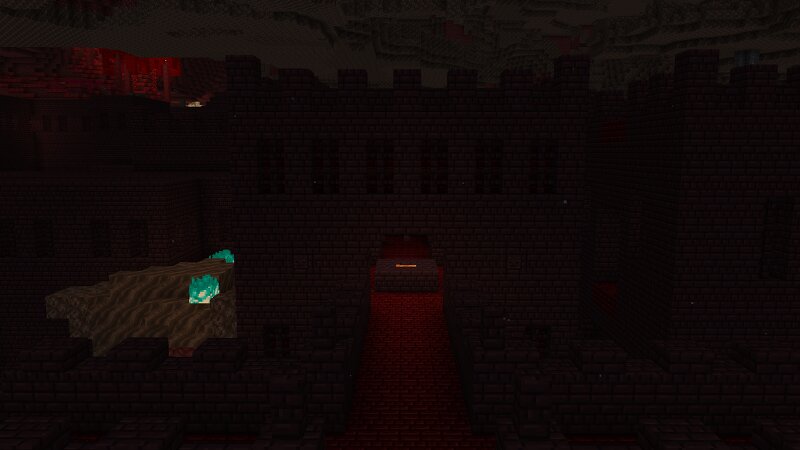
A faithful overhaul of the fortress staying true to the feel of the old vanilla fortress but with a new charm. This datapack revamps the nether fortress with new blocks and more modern, detailed build style. I tried to keep the basic layout of the structure unchanged, while making improvements to how it generates. There should be less pillars cutting off paths or impassable tunnels covered by netherrack. The structure only uses blocks that can be obtained in the nether and match the style of the fortress. The floor is made of red nether brick, the walls are decorated with chiseled nether bricks and lava is used to light up the dark tunnels. The loot table has also been modified. Nether wart should be much easier to get now. In the central keep there is always a blaze spawner and a chest that usually contains some nether wart, so even if the specific rooms that contain those resources don't generate, you can still progress the game without having to find a different fortress. Spawning rules have also been modified, magma cubes and zombie piglins don't belong in a fortress. Now you will see more skeletons and wither skeletons. I hope you like the datapack, feedback is welcome. For an
Added value
What’s included on this page
Preview, categories, compatibility, and tools on this page — not a bare file mirror.
- Creator
- kokoloko_133
- Source
- Minecraft downloads library on Eaglercraft Studio
- Type
- Minecraft data pack
- Price
- Free download on Eaglercraft Studio
- Curation
- Listed with credit to kokoloko_133 · studio preview & install guide
- to version
- Minecraft 26.2
- Compatible with
- Minecraft Java (match version / loader in facts)
- Tags
- Blaze, Fortress, Loot Tables, Nether, Other, Structures
Install guide
How to install this free data pack
Data pack listing with creator credit and world-folder install steps.
- 1Download the datapack archive.
- 2Open your world folder → datapacks, and place the zip or folder there.
- 3Run /reload in-game (or reopen the world) to enable it.
Data packs are Java Edition. Match the pack’s game version to avoid broken recipes or worldgen.
Related free data packs
More curated data packs from the same library section.

MoisturePack · 75 diamonds · 6 views

ProGameBot · 46 diamonds · 3 views

sniffercraft34 · 46 diamonds · 1 views

sniffercraft34 · 45 diamonds · 648 views