
RetroDesign3D The Lost Technology Datapack : Plots, teleportation and more.
Creator: New_RetroDesign3D · 2025-12-17 · Data packs · Free on Eaglercraft Studio
Download RetroDesign3D The Lost Technology Datapack : Plots, teleportation and — free Minecraft data pack. Created by New_RetroDesign3D. Tagged extensive, functions, other, predicates. Drop into your world’s datapacks folder when the archive is available.
Creator notes
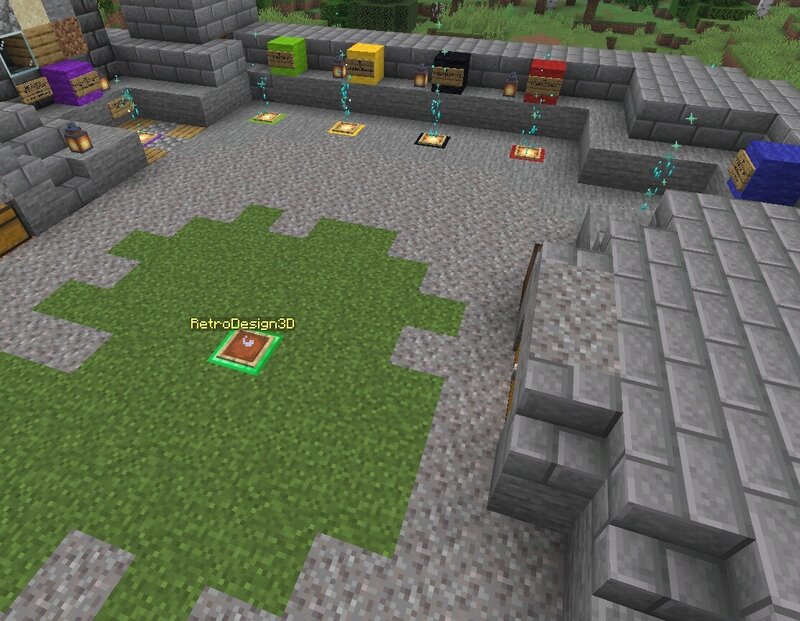
🌍 RetroDesign3D – Lost Technology Datapack 1.21.11 + Will not work properly in 1.21.10 or earlier please see install instructions at the bottom of this page No commands to type. No menus. No plugins. This datapack requires no force loaded chunks or always on spawn chunks at all. 🧭 Teleporters Teleporter pads are craft-able, not just a command . no typing ever! Teleporter pads are placed on selector blocks (colored wool or a diamond block) these selector blocks determine where the Teleporter takes you. Teleporter selector blocks must be on a power source (redstone block or glowstone) There are no force loaded or always on chunks used or required Through setting functions you can disable any type of teleporter Through settings you can also turn on or off "fragile teleporters" what this means is that once a player uses a teleporter it fizzles out / and is removed the teleporter pad must then be re-placed on the "selector" block. This option makes teleporting require continual resources Type of teleport pads you can place are Long distance (15k but with 5k random spread) To death location. (once per death) To last bed slept in (slept in, not just clicked on) To your home plot (if you h
Added value
What’s included on this page
Preview, categories, compatibility, and tools on this page — not a bare file mirror.
- Creator
- New_RetroDesign3D
- Source
- Minecraft downloads library on Eaglercraft Studio
- Type
- Minecraft data pack
- Price
- Free download on Eaglercraft Studio
- Curation
- Listed with credit to New_RetroDesign3D · studio preview & install guide
- Compatible with
- Minecraft Java (match version / loader in facts)
- Tags
- Extensive, Functions, Other, Predicates, Quality Of Life, Recipes
Install guide
How to install this free data pack
Data pack listing with creator credit and world-folder install steps.
- 1Download the datapack archive.
- 2Open your world folder → datapacks, and place the zip or folder there.
- 3Run /reload in-game (or reopen the world) to enable it.
Data packs are Java Edition. Match the pack’s game version to avoid broken recipes or worldgen.
Related free data packs
More curated data packs from the same library section.

MoisturePack · 75 diamonds · 6 views

ProGameBot · 46 diamonds · 3 views

sniffercraft34 · 46 diamonds · 1 views

sniffercraft34 · 45 diamonds · 648 views