
SnapTPA – Fast Pop-up Teleport Requests
Creator: nos1130 · 2026-03-03 · Data packs · Free on Eaglercraft Studio
Download SnapTPA – Fast Pop-up Teleport Requests — free Minecraft data pack. Created by nos1130. Tagged functions, qol, quality of life, qualityoflife. Drop into your world’s datapacks folder when the archive is available.
Creator notes
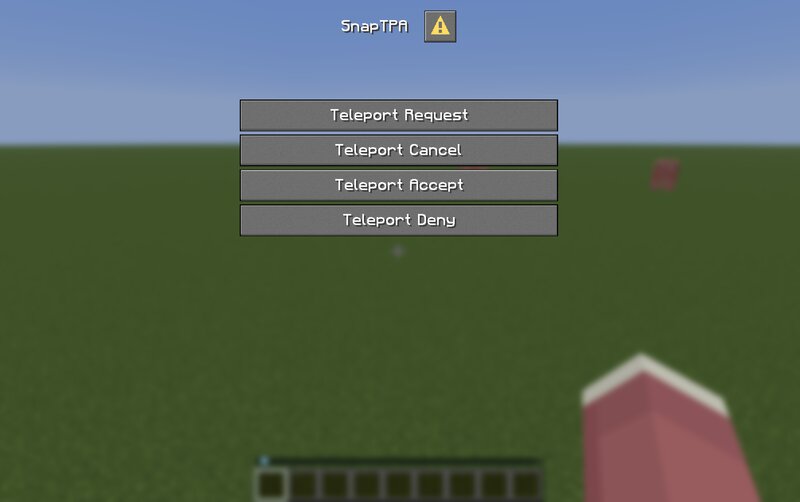
SnapTPA – Fast Pop-up Teleport Requests Tired of typing /trigger tpa set <id> wrong in chat? Sick of long lists or waiting forever on big servers? SnapTPA uses clean pop-up menus so you can send teleport requests in seconds. Just press G → pick "SnapTPA" (if you have other datapacks use dialog ) → type any part of the name → hit confirm. The other player gets a quick "Accept / Deny?" pop-up. Yes → you teleport. No → request gone. Simple. Why players actually use it Works great with 2 players or 100+ — no endless buttons Partial name typing + smart check = fewer typos Requests timeout after 60 seconds automatically No OP needed — perfect for survival SMPs Survives name changes — changing username still work! Zero chat spam — everything stays in pop-ups Multi-targets: Multiply teleport/accept/deny targets compatible Commands / How to start Just Press G Key And That's It! Compatibility Minecraft Java 1.21.6 - 1.21.11 (Suppose work on Snapshot) Vanilla / Paper / Purpur — no mods required (If you wish to use on plugin server) Plays nice with Vanilla Tweaks, AFK tools, homes/warps, etc. Snap series packs coming: SnapHome, SnapWarp, SnapSpawn, etc. Install in 30 seconds 1. Drop the zip in
Added value
What’s included on this page
Preview, categories, compatibility, and tools on this page — not a bare file mirror.
- Creator
- nos1130
- Source
- Minecraft downloads library on Eaglercraft Studio
- Type
- Minecraft data pack
- Price
- Free download on Eaglercraft Studio
- Curation
- Listed with credit to nos1130 · studio preview & install guide
- Compatible with
- Minecraft Java (match version / loader in facts)
- Tags
- Functions, Qol, Quality Of Life, Qualityoflife, Survival, Teleport
Install guide
How to install this free data pack
Data pack listing with creator credit and world-folder install steps.
- 1Download the datapack archive.
- 2Open your world folder → datapacks, and place the zip or folder there.
- 3Run /reload in-game (or reopen the world) to enable it.
Data packs are Java Edition. Match the pack’s game version to avoid broken recipes or worldgen.
Related free data packs
More curated data packs from the same library section.

MoisturePack · 75 diamonds · 6 views

ProGameBot · 46 diamonds · 3 views

sniffercraft34 · 46 diamonds · 1 views

sniffercraft34 · 45 diamonds · 648 views