
The Lost Woods + Deku Scrubs (No resource pack required)
Creator: ThirtyFangs · 2026-01-28 · Data packs · Free on Eaglercraft Studio
Download The Lost Woods + Deku Scrubs (No resource pack required) — free Minecraft data pack. Created by ThirtyFangs. Tagged deku, functions, loot tables, majora. Drop into your world’s datapacks folder when the archive is available.
Creator notes
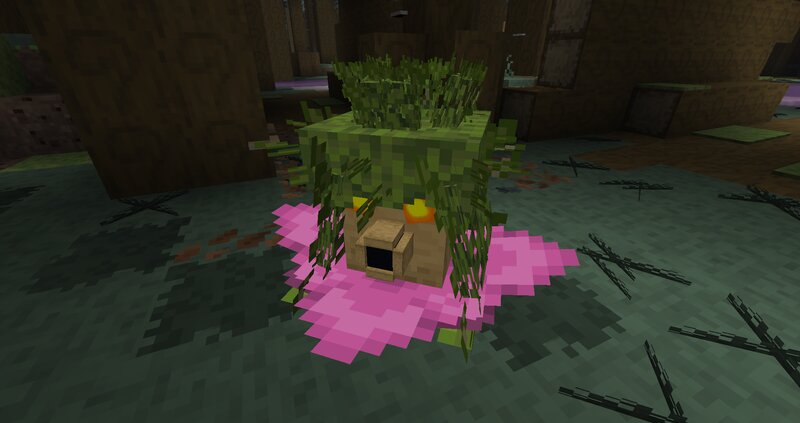
The Lost Woods Download More Biomes datapack if you want this biome to appear naturally in your world, and put "The Lost Woods" datapack above it to include custom particles & poisonous water. The Lost Woods is a wood that appear in the Zelda series. Biome features Poisonous water Narrow forest Custom soundtrack in the mod version Torchflowers grow naturally there, you don't need a sniffer if you are in this biome Fairies Fog Enemies spawning in the biome Bogged Witches Deku Scrubs Deku Scrubs features Only attacks when attacked Loot jungle leaves Has a 3D model Can rotate but can't move out of his position Appears in the lost woods and in swamps The deku scrubs naturally despawn to optimize performance, but if you want to summon a persistent deku scrub, you can do /function sacred_grove:summon_deku_scrub_persistent Preview Click to reveal Depending on the variant of the mod/datapack, the biome will generate naturally, usually next to forests. It can also be generated in single biome worlds.
Added value
What’s included on this page
Preview, categories, compatibility, and tools on this page — not a bare file mirror.
- Creator
- ThirtyFangs
- Source
- Minecraft downloads library on Eaglercraft Studio
- Type
- Minecraft data pack
- Price
- Free download on Eaglercraft Studio
- Curation
- Listed with credit to ThirtyFangs · studio preview & install guide
- to version
- Minecraft 26.3 snapshot
- Compatible with
- Minecraft Java (match version / loader in facts)
- Tags
- Deku, Functions, Loot Tables, Majora, Majorasmask, Ocarinaoftime
Install guide
How to install this free data pack
Data pack listing with creator credit and world-folder install steps.
- 1Download the datapack archive.
- 2Open your world folder → datapacks, and place the zip or folder there.
- 3Run /reload in-game (or reopen the world) to enable it.
Data packs are Java Edition. Match the pack’s game version to avoid broken recipes or worldgen.
Related free data packs
More curated data packs from the same library section.

MoisturePack · 75 diamonds · 6 views

ProGameBot · 46 diamonds · 3 views

sniffercraft34 · 46 diamonds · 1 views

sniffercraft34 · 45 diamonds · 648 views