
Tree Brush
Creator: ThirtyFangs · 2026-01-26 · Data packs · Free on Eaglercraft Studio
Download Tree Brush — free Minecraft data pack. Created by ThirtyFangs. Tagged functions, tool. Drop into your world’s datapacks folder when the archive is available.
Creator notes
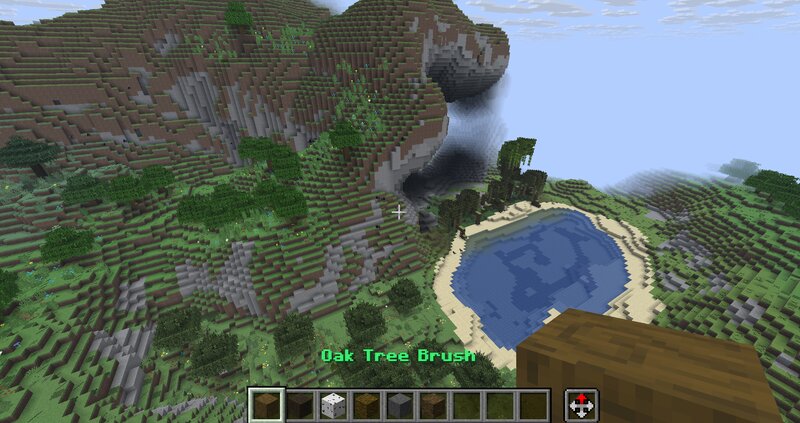
This datapack/mod adds a brush tool to place trees of your choices and vegetations quickly where you want in one click. Biome, vegetations and so on are placed automatically based on the kind of tree selected To get started, run /function tree_brush:wand This datapack allows to place trees, biomes and vegetation very quickly, in a single click without complicated commands, whilst checking that the block below the tree is a grass block to avoid missclicking. Current brush: Oak Birch Spruce Jungle Acacia Mangrove/Swamp oak Grass/vegetation brush for plains and so on Tall birch ( More Biomes required ) Big red mushroom ( More Biomes required ) Old demo with the oak brush tool:
Added value
What’s included on this page
Preview, categories, compatibility, and tools on this page — not a bare file mirror.
- Creator
- ThirtyFangs
- Source
- Minecraft downloads library on Eaglercraft Studio
- Type
- Minecraft data pack
- Price
- Free download on Eaglercraft Studio
- Curation
- Listed with credit to ThirtyFangs · studio preview & install guide
- to version
- Minecraft 26.1
- Compatible with
- Minecraft Java (match version / loader in facts)
- Tags
- Functions, Tool
Install guide
How to install this free data pack
Data pack listing with creator credit and world-folder install steps.
- 1Download the datapack archive.
- 2Open your world folder → datapacks, and place the zip or folder there.
- 3Run /reload in-game (or reopen the world) to enable it.
Data packs are Java Edition. Match the pack’s game version to avoid broken recipes or worldgen.
Related free data packs
More curated data packs from the same library section.

MoisturePack · 75 diamonds · 6 views

ProGameBot · 46 diamonds · 3 views

sniffercraft34 · 46 diamonds · 1 views

sniffercraft34 · 45 diamonds · 648 views