
True Paxels
Creator: CYKLOPPS · 2026-07-03 · Data packs · Free on Eaglercraft Studio
Download True Paxels — free Minecraft data pack. Created by CYKLOPPS. Tagged advancements, equipment, item, paxel. Drop into your world’s datapacks folder when the archive is available.
Creator notes
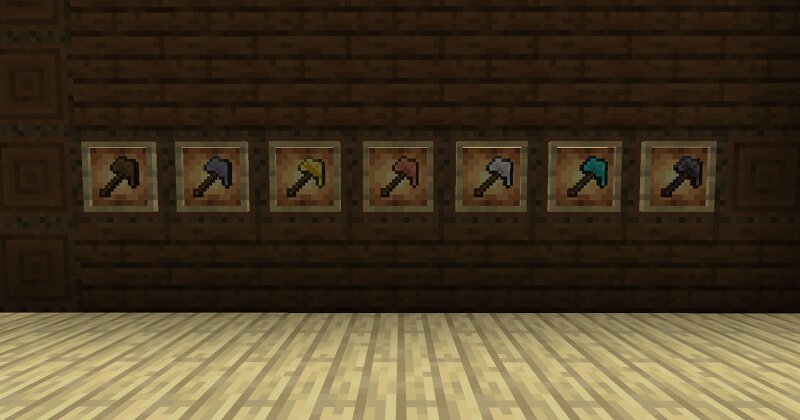
FOR MINECRAFT 26.3 SNAPSHOT 2 Minecraft 26.3 snapshot 2 gave us a new data component "minecraft:block_transformer" which allows items to transform blocks into another block through interactions. Now, I'm bringing the classic, all-in-one tool, to vanilla Minecraft with True Paxels. This data pack adds new recipes that result in a paxel for every tool tier, combining the functionality of a pickaxe, an axe and a shovel into one singular tool. Mine stone, strip logs and flatten dirt paths without having to constantly swap between tools. Features: Craftable wooden, stone, golden, copper, iron, diamond and netherite paxel Functions as a pickaxe, axe, and shovel in one tool Mines stone, wood and dirt blocks Survival friendly Paxels make everyday tasks faster and keep your hot bar free for the items you actually want to carry. NOTICE There is currently a bug with the new data component, "minecraft:block_transformer", that does not transform double blocks like copper doors and copper double chests. Once this bug is patched, a trigger command will be added for players to properly modify the paxel into the desired full functioning tool. My Socials Discord ⋅ Twitter ⋅ Instagram ⋅ YouTube ⋅ Ko-
Added value
What’s included on this page
Preview, categories, compatibility, and tools on this page — not a bare file mirror.
- Creator
- CYKLOPPS
- Source
- Minecraft downloads library on Eaglercraft Studio
- Type
- Minecraft data pack
- Price
- Free download on Eaglercraft Studio
- Curation
- Listed with credit to CYKLOPPS · studio preview & install guide
- Compatible with
- Minecraft Java (match version / loader in facts)
- Tags
- Advancements, Equipment, Item, Paxel, Recipe, Recipes
Install guide
How to install this free data pack
Data pack listing with creator credit and world-folder install steps.
- 1Download the datapack archive.
- 2Open your world folder → datapacks, and place the zip or folder there.
- 3Run /reload in-game (or reopen the world) to enable it.
Data packs are Java Edition. Match the pack’s game version to avoid broken recipes or worldgen.
Related free data packs
More curated data packs from the same library section.

MoisturePack · 75 diamonds · 6 views

ProGameBot · 46 diamonds · 3 views

sniffercraft34 · 46 diamonds · 1 views

sniffercraft34 · 45 diamonds · 648 views