
Unlimited Enchant Levels
Creator: AppleTomaTo · 2026-08-20 · Data packs · Free on Eaglercraft Studio
Download Unlimited Enchant Levels — free Minecraft data pack. Created by AppleTomaTo. Tagged functions, game mechanic. Drop into your world’s datapacks folder when the archive is available.
Creator notes
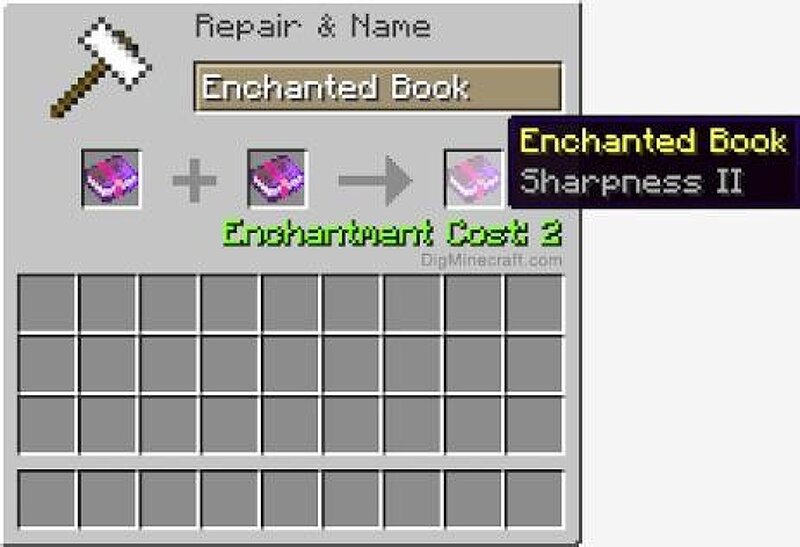
# Unlimited Enchant Levels **Unlimited Enchant Levels** is a Minecraft Java Edition 26.2+ data pack by **AppleTomaTo** that completely removes the level cap on over 30 vanilla enchantments, allowing you to upgrade enchantments in a standard anvil far beyond their vanilla limits — all the way up to level 255! By combining identical enchantments in an anvil (e.g., Sharpness V + Sharpness V = Sharpness VI), players can continuously increase item power while keeping vanilla enchantment costs balanced and managing Minecraft's hardcoded "Too Expensive!" anvil penalty. --- ## Key Features - **Uncap Level Limits up to 255**: Max level caps for ~30 scaling enchantments (Sharpness, Protection, Power, Efficiency, Looting, Unbreaking, etc.) are raised to **255** (the engine maximum). - **Automatic Prior Work Penalty Clearance**: Automatically resets the hidden "Prior Work Penalty" on your held items, armor, and inventory every second. This prevents items from quickly becoming unrepairable or un-enchantable in anvils. - **Vanilla Anvil Balance Preserved**: Base enchantment costs (`anvil_cost`) remain untouched from vanilla. Cheap enchantments stay cheap, and expensive ones stay expensive. - **M
Added value
What’s included on this page
Preview, categories, compatibility, and tools on this page — not a bare file mirror.
- Creator
- AppleTomaTo
- Source
- Minecraft downloads library on Eaglercraft Studio
- Type
- Minecraft data pack
- Price
- Free download on Eaglercraft Studio
- Curation
- Listed with credit to AppleTomaTo · studio preview & install guide
- to version
- Minecraft 26.3 snapshot
- Compatible with
- Minecraft Java (match version / loader in facts)
- Tags
- Functions, Game Mechanic
Install guide
How to install this free data pack
Data pack listing with creator credit and world-folder install steps.
- 1Download the datapack archive.
- 2Open your world folder → datapacks, and place the zip or folder there.
- 3Run /reload in-game (or reopen the world) to enable it.
Data packs are Java Edition. Match the pack’s game version to avoid broken recipes or worldgen.
Related free data packs
More curated data packs from the same library section.

MoisturePack · 75 diamonds · 6 views

ProGameBot · 46 diamonds · 3 views

sniffercraft34 · 46 diamonds · 1 views

sniffercraft34 · 45 diamonds · 648 views