
Waystone by Xek
Creator: Xek · 2026-09-23 · Data packs · Free on Eaglercraft Studio
Download Waystone by Xek — free Minecraft data pack. Created by Xek. Tagged advancements, functions, loot tables, predicates. Drop into your world’s datapacks folder when the archive is available.
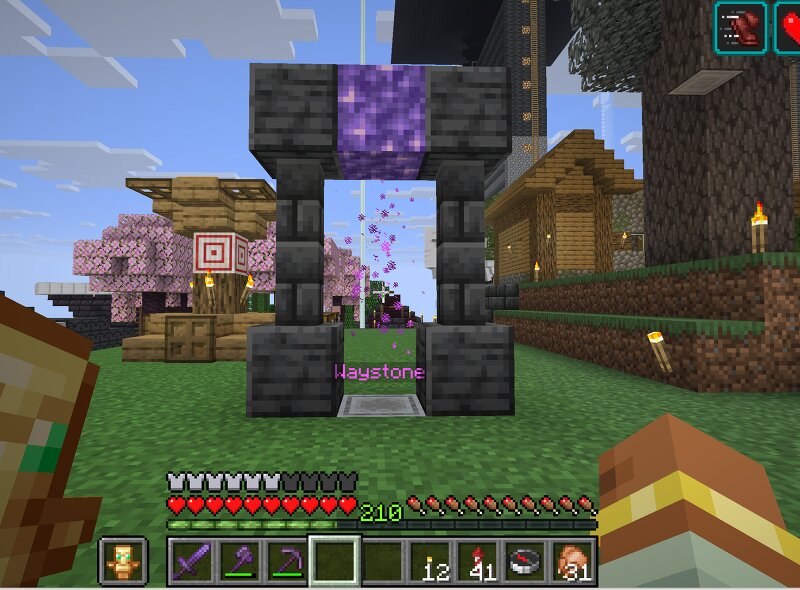
Creator notes
🌀 WAYSTONES V1.6.1 — SURVIVAL UPDATE (Added Unlimited Distance to travel, Pet was tested as well) 9/24/2026 More updates coming soon! Waystones adds a survival-friendly fast travel system to your Minecraft world! Craft, name, and place Waystones at locations you've discovered to create your own travel network. Explore first. Connect your world. Make the journey home easier. ✨ FEATURES • Up to 9 active Waystones • Up to 8 destinations from each Waystone • Name Waystones using an anvil • Interactive destination menu • Travel with your horse • Travel with tamed wolves & cats • Sitting pets can travel too • 10-block pet travel radius • Safe Arrival system • 10-second Combat Lockout • 10-second travel cooldown • 3 XP Level travel cost • Private Home Waystone for LAN play • Explosion-resistant Waystone network • Decoration friendly • Custom Waystone advancement • Survival friendly • Vanilla style • No resource pack required • No mods required 🏠 PRIVATE HOME WAYSTONE Your first Waystone becomes your Home Waystone. In LAN play, other players cannot teleport to your Home Waystone. Your Home remains your private destination while your other Waystones can be used throughout the network. 🌀 BUI
Added value
What’s included on this page
Preview, categories, compatibility, and tools on this page — not a bare file mirror.
- Creator
- Xek
- Source
- Minecraft downloads library on Eaglercraft Studio
- Type
- Minecraft data pack
- Price
- Free download on Eaglercraft Studio
- Curation
- Listed with credit to Xek · studio preview & install guide
- Compatible with
- Minecraft Java (match version / loader in facts)
- Tags
- Advancements, Functions, Loot Tables, Predicates, Quality Of Life, Recipes
Install guide
How to install this free data pack
Data pack listing with creator credit and world-folder install steps.
- 1Download the datapack archive.
- 2Open your world folder → datapacks, and place the zip or folder there.
- 3Run /reload in-game (or reopen the world) to enable it.
Data packs are Java Edition. Match the pack’s game version to avoid broken recipes or worldgen.
Related free data packs
More curated data packs from the same library section.

MoisturePack · 75 diamonds · 6 views

ProGameBot · 46 diamonds · 3 views

sniffercraft34 · 46 diamonds · 1 views

sniffercraft34 · 45 diamonds · 648 views