
Wolf Armor Upgrades 1.21.4+ (resource pack required)
Creator: Vilmix · 2026-04-03 · Data packs · Free on Eaglercraft Studio
Download Wolf Armor Upgrades 1.21.4+ (resource pack required) — free Minecraft data pack. Created by Vilmix. Tagged advancements, armor, armors, datapack. Drop into your world’s datapacks folder when the archive is available.
Creator notes
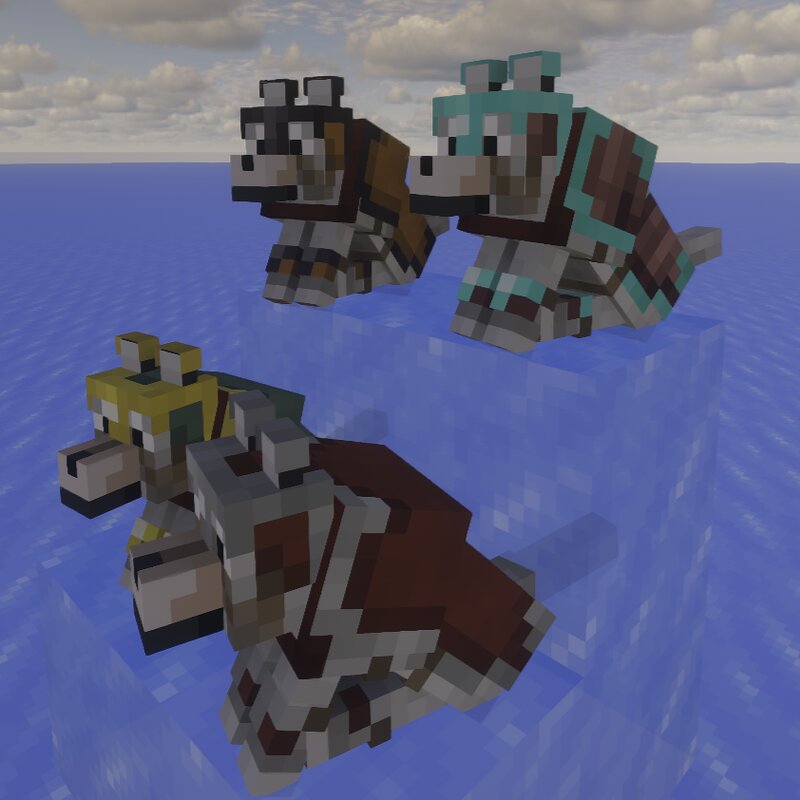
This data pack adds new variants of wolf armor that can be crafted or obtained as loot from certain structures. The upgrades it adds are: iron , gold , diamond , and netherite . You can also add leather to any of these variants or to regular wolf armor as a separate variant. The durability of each armor variant - -Basic wolf armor (no upgrades) -> 64 -Leather -> 80 -Gold -> 128 -Iron -> 224 -Diamond -> 448 -Netherite -> 768 Adding leather gives +16 max durability -Gold + Leather -> 144 -Iron + Leather -> 240 -Diamond + Leather -> 464 -Netherite + Leather -> 784 How can I add leather to upgraded armor or remove it? Take the leather in your left hand and the armor in your right. Then right-click. To remove it, follow the same steps, but instead of the leather, take the shears in your left hand. Another addition is the ability to apply the Unbreaking and Thorns enchantments to the wolf's armor, along with a few new enchantments. New enchantments - Absorptive (gives a chance to regain some armor durability when taking damage) - Matter Stealer (gives a chance to regain some durability when dealing damage) - Frosty Paws (works same as Frost Walker ) - Aqua Mobility (works similar to Dept
Added value
What’s included on this page
Preview, categories, compatibility, and tools on this page — not a bare file mirror.
- Creator
- Vilmix
- Source
- Minecraft downloads library on Eaglercraft Studio
- Type
- Minecraft data pack
- Price
- Free download on Eaglercraft Studio
- Curation
- Listed with credit to Vilmix · studio preview & install guide
- Compatible with
- Minecraft Java (match version / loader in facts)
- Tags
- Advancements, Armor, Armors, Datapack, Dog, Functions
Install guide
How to install this free data pack
Data pack listing with creator credit and world-folder install steps.
- 1Download the datapack archive.
- 2Open your world folder → datapacks, and place the zip or folder there.
- 3Run /reload in-game (or reopen the world) to enable it.
Data packs are Java Edition. Match the pack’s game version to avoid broken recipes or worldgen.
Related free data packs
More curated data packs from the same library section.

MoisturePack · 75 diamonds · 6 views

ProGameBot · 46 diamonds · 3 views

sniffercraft34 · 46 diamonds · 1 views

sniffercraft34 · 45 diamonds · 648 views