
Working Piano - Keyboard only
Creator: _Dazai_ · 2026-07-31 · Data packs · Free on Eaglercraft Studio
Download Working Piano - Keyboard only — free Minecraft data pack. Created by _Dazai_. Tagged functions, instrument, keyboard, music. Drop into your world’s datapacks folder when the archive is available.
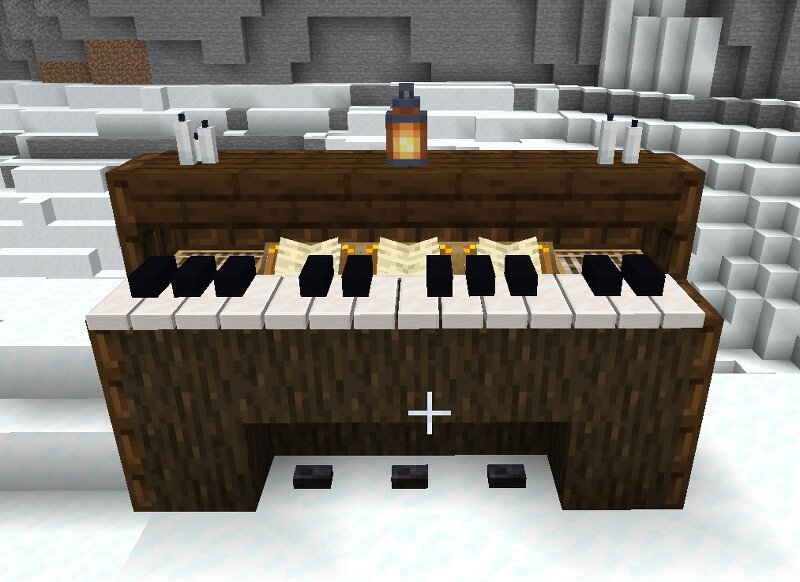
Creator notes
ROAKO-STYLE 24-KEY PIANO - MINECRAFT JAVA 26.2 Created after watching https://www.youtube.com/watch?v=Y4FnAFdry2Q Roako. INSTALL 1. Put this ZIP in: .minecraft/saves/YOUR WORLD/datapacks/ 2. In the world, run: /reload 3. Stand at the center-front of the future keyboard. 4. Run: /function piano:build The keyboard is approximately 4.85 blocks wide, centered on you, and extends 1 block south (+Z). Right-click keys to play them. REMOVE /function piano:remove The pack creates display and interaction entities only. It does not alter ordinary blocks.
Added value
What’s included on this page
Preview, categories, compatibility, and tools on this page — not a bare file mirror.
- Creator
- _Dazai_
- Source
- Minecraft downloads library on Eaglercraft Studio
- Type
- Minecraft data pack
- Price
- Free download on Eaglercraft Studio
- Curation
- Listed with credit to _Dazai_ · studio preview & install guide
- Compatible with
- Minecraft Java (match version / loader in facts)
- Tags
- Functions, Instrument, Keyboard, Music, Other, Piano
Install guide
How to install this free data pack
Data pack listing with creator credit and world-folder install steps.
- 1Download the datapack archive.
- 2Open your world folder → datapacks, and place the zip or folder there.
- 3Run /reload in-game (or reopen the world) to enable it.
Data packs are Java Edition. Match the pack’s game version to avoid broken recipes or worldgen.
Related free data packs
More curated data packs from the same library section.

MoisturePack · 75 diamonds · 6 views

ProGameBot · 46 diamonds · 3 views

sniffercraft34 · 46 diamonds · 1 views

sniffercraft34 · 45 diamonds · 648 views