
Worm Madness (26.1 - 26.2)
Creator: TheStarGamer · 2026-04-07 · Data packs · Free on Eaglercraft Studio
Download Worm Madness (26.1 - 26.2) — free Minecraft data pack. Created by TheStarGamer. Tagged advancements, cute, fun, functions. Drop into your world’s datapacks folder when the archive is available.
Creator notes
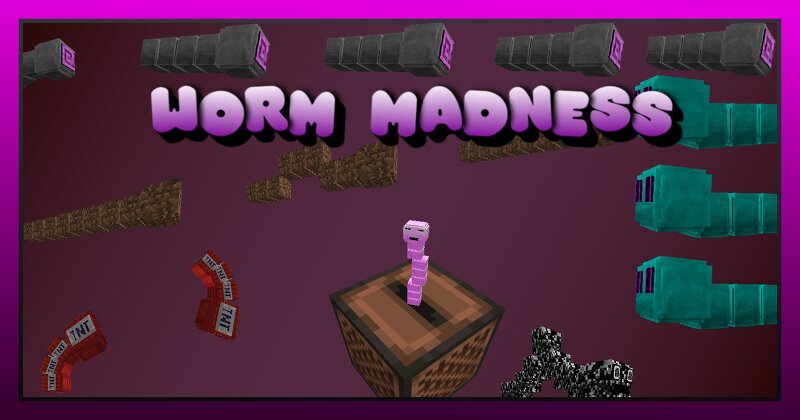
Worm Madness is a fun Datapack featuring Worms! (SPOILER ALERT) It adds four useful Worm Items, Worm Skins for your Dogs, a little Friend for your Jukeboxes and the IMMORTAL WORM! Features: Dirt Worm Description: Tills any Dirt underneath it, making building large Crops a cakewalk. It has infinite Range and dies when it falls down or walks into a Wall. Commands: /trigger worm.toggleDirtWormFertilize - Makes Dirt Worms fertilize the Crops beneath (Default: Off) /trigger worm.giveWorms - Gives a Stack of all Worms (Player must be in Creative) TNT Worm Description: Throw this Worm to cause Chaos! It will launch itself up in the Air and Explode on impact. The further it flies, the bigger the Explosion! Commands: /trigger worm.toggleTNTWormPower - Changes the Explosion Power (Default: Low) /trigger worm.giveWorms - Gives a Stack of all Worms (Player must be in Creative) Wormhole Worm Description: A better Version of an Ender Pearl. This Worm will teleport the Player after hitting a surface. It can pass thin Walls and Floors if used right next to them and will always pass Doors! Commands: /trigger worm.toggleWormholeWormGravity - Toggles Gravity (Default: Off) /trigger worm.giveWorms - G
Added value
What’s included on this page
Preview, categories, compatibility, and tools on this page — not a bare file mirror.
- Creator
- TheStarGamer
- Source
- Minecraft downloads library on Eaglercraft Studio
- Type
- Minecraft data pack
- Price
- Free download on Eaglercraft Studio
- Curation
- Listed with credit to TheStarGamer · studio preview & install guide
- to version
- Minecraft 26.2
- Compatible with
- Minecraft Java (match version / loader in facts)
- Tags
- Advancements, Cute, Fun, Functions, Funny, Item
Install guide
How to install this free data pack
Data pack listing with creator credit and world-folder install steps.
- 1Download the datapack archive.
- 2Open your world folder → datapacks, and place the zip or folder there.
- 3Run /reload in-game (or reopen the world) to enable it.
Data packs are Java Edition. Match the pack’s game version to avoid broken recipes or worldgen.
Related free data packs
More curated data packs from the same library section.

MoisturePack · 75 diamonds · 6 views

ProGameBot · 46 diamonds · 3 views

sniffercraft34 · 46 diamonds · 1 views

sniffercraft34 · 45 diamonds · 648 views