
Zelda Door Mechanics (No resource pack)
Creator: ThirtyFangs · 2026-01-15 · Data packs · Free on Eaglercraft Studio
Download Zelda Door Mechanics (No resource pack) — free Minecraft data pack. Created by ThirtyFangs. Tagged functions, game mechanic. Drop into your world’s datapacks folder when the archive is available.
Creator notes
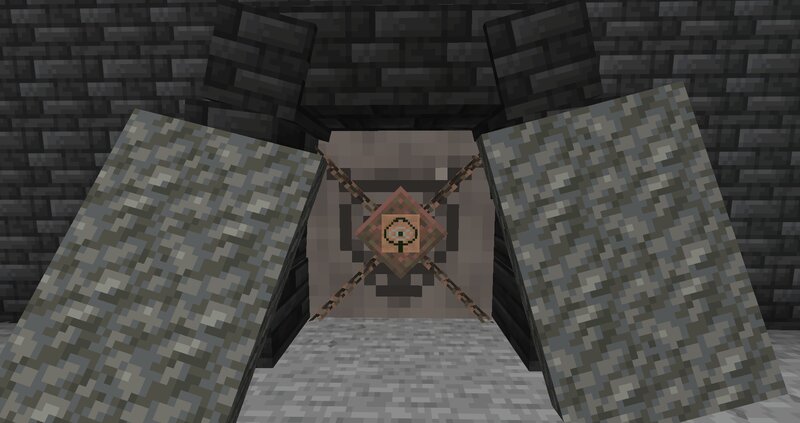
Features of the door No resource pack required Has sounds Has collision when closed Get open when getting close Will be placed facing north/south by default, you can rotate to 90° Possibility to lock door and to get a key Peebles animation on the ground when the door is closing Model for locked door Once a locked door is unlocked, the key from the player inventory get deleted Animation inspired from Zelda: Twilight Princess when a locked door is unlocked If you don't want to read all this, just do /function door:help in-game and read the step-by-step documentation in-game! How to place & remove a door To place a door (you need OP), follow those 2 easy steps carefully: Go where you wanna place the door, and check for your position (X,Y,Z). Then, go in spectator mode and do /teleport [your coordinates, but add .5 after each number] (example: if your coordinates are x 12, y 64 and z -100, run /teleport 12.5 64.5 -99.5 Run /function door:_/create It's done! To remove a door, stand on it and run /function door:remove_current_door How to lock & unlock a door To lock a door: Go where you wanna place the door, and check for your position (X,Y,Z). Then, go in spectator mode and do /teleport
Added value
What’s included on this page
Preview, categories, compatibility, and tools on this page — not a bare file mirror.
- Creator
- ThirtyFangs
- Source
- Minecraft downloads library on Eaglercraft Studio
- Type
- Minecraft data pack
- Price
- Free download on Eaglercraft Studio
- Curation
- Listed with credit to ThirtyFangs · studio preview & install guide
- to version
- Minecraft 26.1
- Compatible with
- Minecraft Java (match version / loader in facts)
- Tags
- Functions, Game Mechanic
Install guide
How to install this free data pack
Data pack listing with creator credit and world-folder install steps.
- 1Download the datapack archive.
- 2Open your world folder → datapacks, and place the zip or folder there.
- 3Run /reload in-game (or reopen the world) to enable it.
Data packs are Java Edition. Match the pack’s game version to avoid broken recipes or worldgen.
Related free data packs
More curated data packs from the same library section.

MoisturePack · 75 diamonds · 6 views

ProGameBot · 46 diamonds · 3 views

sniffercraft34 · 46 diamonds · 1 views

sniffercraft34 · 45 diamonds · 648 views